
Statement
A display-only question that shows text to the respondent without requiring an answer. Useful for instructions, section transitions, or informational content.
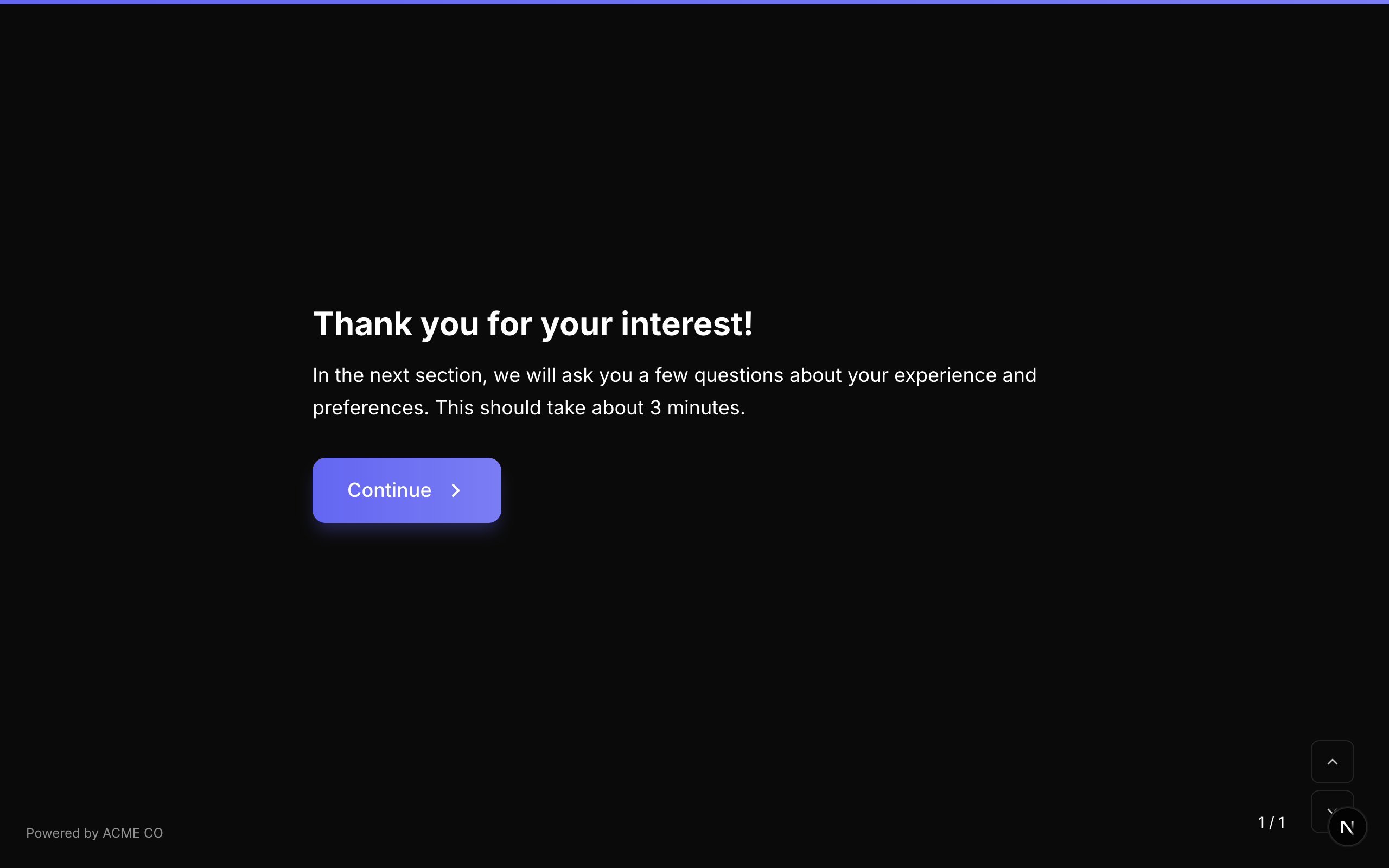
Type identifier: statement
Properties
| Property | Type | Description | Default |
|---|---|---|---|
buttonText | string | The text displayed on the continue button. | "Continue" |
Behavior
- The question number is not displayed for statements.
- No input field is shown.
- The respondent clicks the button to advance to the next question.
- Statements are never "required" since they have no answer to validate.
Logic Jump Operators
equals, not_equals, is_answered, is_not_answered
Statements are great for breaking up long forms into sections. Use them to provide context or instructions before a series of related questions.
Answer Format
Statements do not produce an answer. The value is effectively undefined.
Welcome Screen
An introductory screen displayed at the beginning of the form, before any questions.
Type identifier: welcome_screen
Properties
| Property | Type | Description | Default |
|---|---|---|---|
buttonText | string | The text on the button that starts the form. | "Start" |
Behavior
- The welcome screen is displayed before Question 1.
- The title and description support rich text and
{variable}substitution. - Clicking the button begins the form.
Welcome screens added as questions in the question list function similarly to the form-level welcome screen settings. The form-level welcome screen is shown first; if you also add a welcome_screen question, it appears at its position in the question order.
Answer Format
Welcome screens do not produce an answer.
End Screen
A closing screen displayed after the form is submitted. In quiz modes, multiple end screens can be added with conditional display based on the respondent's score.
Type identifier: end_screen
Properties
| Property | Type | Description | Default |
|---|---|---|---|
buttonText | string | Optional button text (e.g., "Take the quiz again"). | None |
scoreRange | object | For quiz modes: the score range that triggers this end screen. | None |
scoreRange.min | number | Minimum score to show this end screen (inclusive). | None |
scoreRange.max | number | Maximum score to show this end screen (inclusive). | None |
Standard Mode Behavior
In standard mode, a single end screen replaces the default thank-you screen. Its title and description are displayed after submission.
Quiz Mode Behavior
In quiz modes, multiple end screens can be defined:
- Knowledge Quiz / Lead Qualification: The end screen with a
scoreRangematching the respondent's total score is displayed. - Match Quiz: The end screen that accumulated the most tallies from the respondent's choice outcomes is displayed.
End screen questions appear in the question list but are not shown during the form flow. They are only rendered after submission based on the scoring logic.
Answer Format
End screens do not produce an answer.
Summary
A review screen that displays all the respondent's answers before final submission. The respondent can review their answers and optionally go back to edit any question.
Type identifier: summary
Properties
| Property | Type | Description | Default |
|---|---|---|---|
summaryLabel | string | Custom heading for the summary section. | "Review your answers" |
summaryYesText | string | Label for the confirm/submit button. | "Looks good, submit!" |
summaryNoText | string | Label for the button to go back and edit. | "I want to change something" |
Behavior
- The summary displays all answered questions with their responses.
- Each question in the summary is clickable, allowing the respondent to jump back to that question and edit their answer.
- The question number prefix is hidden.
- Two buttons are presented: confirm (submit) and edit (go back).
Dependencies
The Summary question requires access to all questions and all answers. The form renderer passes allQuestions, allAnswers, onGoToQuestion, and onRestart props to this field.
Answer Format
The Summary question does not produce its own answer. It is a display-only component.
Place the Summary question as the last question in your form (before any end screens) to give respondents a chance to review before submitting. This is especially valuable for long forms or forms with required fields.
Question Group
Groups multiple sub-questions into a single form step. The sub-questions are presented one at a time within the group, with internal navigation. This allows you to create sections of related questions that function as a single unit in the overall form flow.
Type identifier: question_group
Properties
| Property | Type | Description | Default |
|---|---|---|---|
fields | FormQuestion[] | An array of sub-questions within the group. Each sub-question is a full question object with its own type, title, properties, and logic jumps. | [] |
Behavior
- The group appears as a single step in the overall form.
- Sub-questions are presented one at a time with forward/backward navigation within the group.
- Each sub-question can have its own logic jumps. If a logic jump's destination is:
- Another sub-question within the group: navigation happens internally.
- A question outside the group: the group exits and navigation continues at the top level.
end: the form skips to submission.
- The "Back" button navigates within the group first. If the respondent is on the first sub-question, pressing "Back" exits the group and goes to the previous top-level question.
- The question number prefix is hidden for the group container.
Sub-Question Logic
Logic jumps on sub-questions can reference answers from other sub-questions within the same group, or answers from top-level questions outside the group (via the flatAnswers map).
Variable actions on sub-question logic jumps execute against the same variable state as the parent form.
Validation
Each sub-question within the group is validated individually. The respondent must satisfy each required sub-question as they navigate through the group.
Sub-questions that are skipped by internal logic jumps are not validated (their required constraint is waived).
Answer Format
The answer is stored as an object (Record<string, unknown>) mapping each sub-question ID to its answer:
{
  "sub_q1": "John Smith",
  "sub_q2": "john@example.com",
  "sub_q3": 5
}
Question Groups are ideal for organizing multi-part questions (e.g., a contact form section, a preferences section) while maintaining the one-question-at-a-time flow within the group.
Multi-Question Page
Displays multiple questions on a single screen simultaneously. Unlike Question Groups (which show one sub-question at a time), Multi-Question Pages show all their sub-questions at once.
Type identifier: multi_question_page
Properties
| Property | Type | Description | Default |
|---|---|---|---|
fields | FormQuestion[] | An array of sub-questions to display on the page. Each sub-question is a full question object. | [] |
Behavior
- All sub-questions are rendered on a single screen.
- The respondent fills in all visible questions and clicks a single "OK" button to proceed.
- The question number prefix is hidden for the container.
- Logic jumps on sub-questions can trigger navigation to questions outside the multi-question page.
Validation
All required sub-questions must be answered before the page can be submitted. Validation errors are shown inline next to the relevant sub-question.
Answer Format
The answer is stored as an object (Record<string, unknown>) mapping each sub-question ID to its answer:
{
  "sub_q1": "Jane Doe",
  "sub_q2": "jane@example.com",
  "sub_q3": "Engineering"
}
Multi-Question Pages are useful when you have several short, related questions that the respondent can answer quickly without needing individual screens for each one. This can significantly speed up form completion for groups of simple questions.
Markdown
A rich content block that supports Markdown formatting with inline form fields. You can embed text inputs, dropdowns, and other interactive elements directly within Markdown content.
Type identifier: markdown
Properties
| Property | Type | Description | Default |
|---|---|---|---|
markdown | string | The Markdown content string. Supports standard Markdown formatting plus inline field syntax. | "" |
Inline Field Syntax
Embed form fields within your Markdown using double curly braces:
{{type:label}}
Where type is the field type and label is the display label for the field.
Behavior
- The question header (title and description) is hidden for Markdown questions. The Markdown content IS the question.
- Inline fields are parsed from the Markdown content and rendered as interactive inputs within the text.
- The respondent fills in the inline fields and submits the entire Markdown block as one answer.
HTML in Markdown
Markdown content can include a little raw HTML, but only the formatting tags a question title allows: <p>, <br>, <strong>, <em>, <u>, <s>, <a>, <ul>, <ol>, <li>, <code>, <span>, <sub> and <sup>. They keep only the href, target, rel, style and class attributes (plus data-* and aria-*), and a link's address must be http(s):, mailto:, tel: or relative.
- Any other tag is removed and its text kept: a
<b>,<i>,<div>,<h1>,<img>or<table>written in HTML loses its formatting or its element. Markdown syntax for bold, headings, images and tables is unaffected: use it instead. <script>,<style>,<iframe>and other embedded content such as<object>and<embed>, forms and their controls (<form>,<input>,<button>,<select>,<textarea>),<svg>and<math>are removed together with their content.
The same rules apply to the text of Contract questions. HTML in a variable's value is never rendered in either: it shows exactly as written (see Variables).
Validation
Each inline field follows its own validation rules based on its type.
Answer Format
The answer is stored as an object (Record<string, unknown>) mapping each inline field label to its value.
Markdown questions are perfect for creating fill-in-the-blank exercises, contract-style forms, or any content where form fields need to be interspersed with formatted text.