
الاختيار المتعدد
قدم قائمة خيارات للمستجيب للاختيار منها. يدعم الاختيار المفرد والمتعدد وإدخال "أخرى" الحر والترتيب العشوائي والترتيب الأبجدي. يمكن لكل خيار أن يحمل صورته أو مقطعه المرئي أو أيقونته الخاصة، وتبدّل الخاصية layout بين قائمة عمودية وشبكة بطاقات صور — لذا يغطي هذا النوع الواحد الخيارات النصية العادية والخيارات القائمة على الصور معًا.
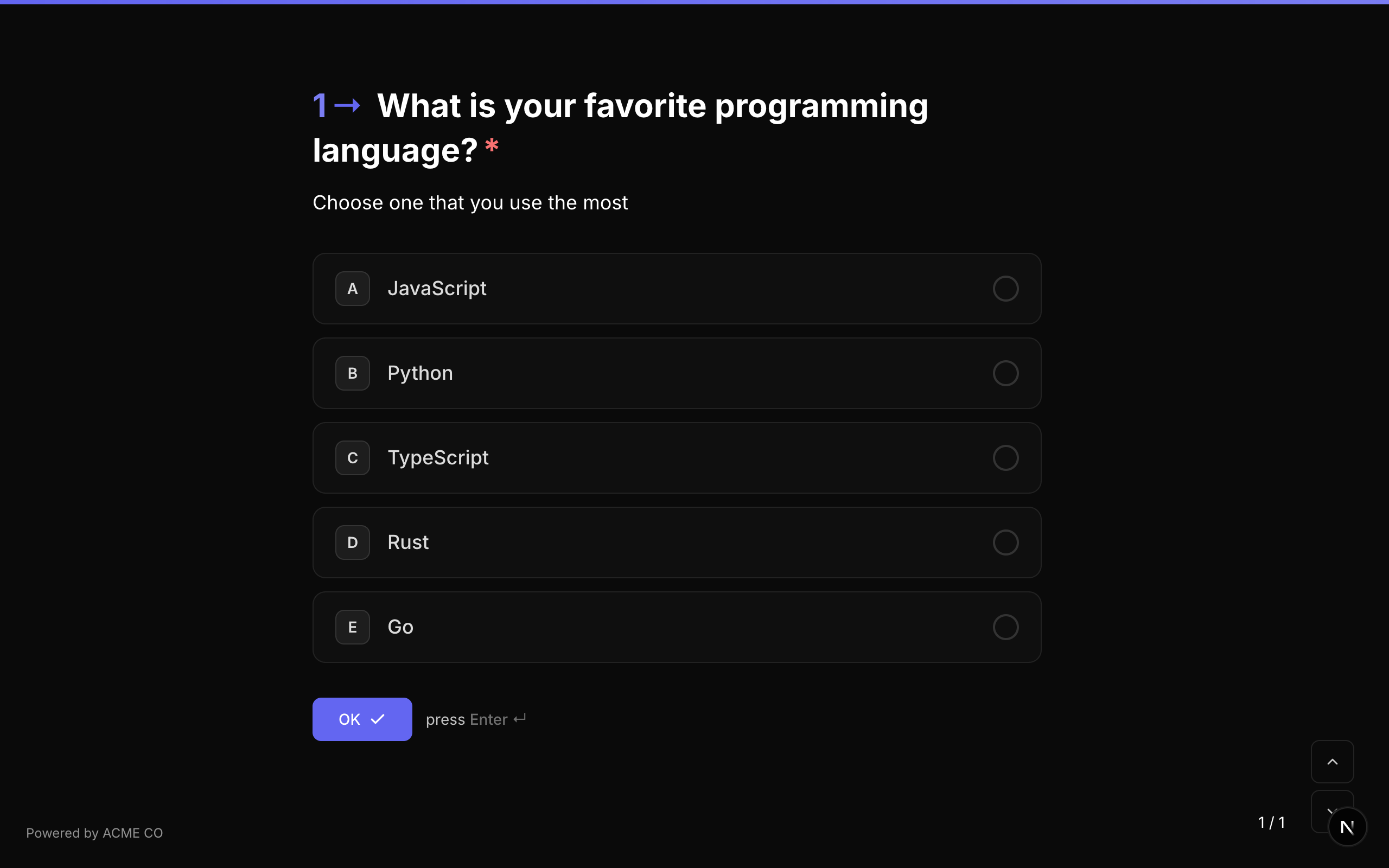
معرّف النوع: multiple_choice
الخصائص
| الخاصية | النوع | الوصف | الافتراضي |
|---|---|---|---|
choices | Choice[] | مصفوفة خيارات الاختيار. لكل خيار id و label و media اختياري. | [] |
layout | string | طريقة عرض الخيارات: stacked (قائمة عمودية مع صور مصغّرة اختيارية)، أو blocks (شبكة بطاقات صور)، أو staggered (شرائح بحجم المحتوى تلتف على أسطر)، أو grid (شبكة بأعمدة ثابتة). | stacked |
allowMultiple | boolean | السماح للمستجيب باختيار أكثر من خيار واحد. | false |
allowOther | boolean | عرض خيار "أخرى" مع إدخال نص حر يمكن للمستجيب كتابة إجابة مخصصة فيه. | false |
randomize | boolean | ترتيب الخيارات عشوائيًا في كل مرة يُعرض فيها السؤال. | false |
alphabeticalOrder | boolean | ترتيب الخيارات أبجديًا. يُتجاهل إذا كان randomize مفعّلًا (العشوائي يأخذ الأولوية). | false |
choiceSource | string | مصدر الخيارات: fixed يستخدم choices، وvariable يحمّلها من متغيّر. راجع قسم «الخيارات من متغيّر» أدناه. | fixed |
كائن الخيار
كل خيار في مصفوفة choices يحتوي على:
| الحقل | النوع | الوصف |
|---|---|---|
id | string | معرّف فريد لهذا الخيار. يُستخدم في القفزات المنطقية والتسجيل. |
label | string | نص العرض للخيار. |
media | QuestionMedia | صورة أو مقطع مرئي أو أيقونة اختيارية لهذا الخيار. عيّن media.display للتحكم في طريقة عرضها — راجع أدناه. |
وسائط الخيار
يمكن لأي خيار أن يحمل وسائطه الخاصة. تحدد media.display كيفية استقرارها على الخيار:
| العرض | الوصف |
|---|---|
thumbnail | صورة صغيرة بجانب تسمية الخيار. |
background | تملأ الصورة سطح الخيار، مع اقتصاصها لتغطيته بالكامل. |
background-fit | تملأ الصورة سطح الخيار مع بقائها كاملة، محاطة بأشرطة على لون خلفية الخيار. |
تدعم وسائط الخيار المعالجات نفسها التي تدعمها وسائط السؤال — الفلاتر والصبغة والحدود ونقطة التركيز والتكبير. راجع عرض وسائط الخيار لمعرفة الفرق بين وضعي الملء والاحتواء ومتى تستخدم كلًا منهما.
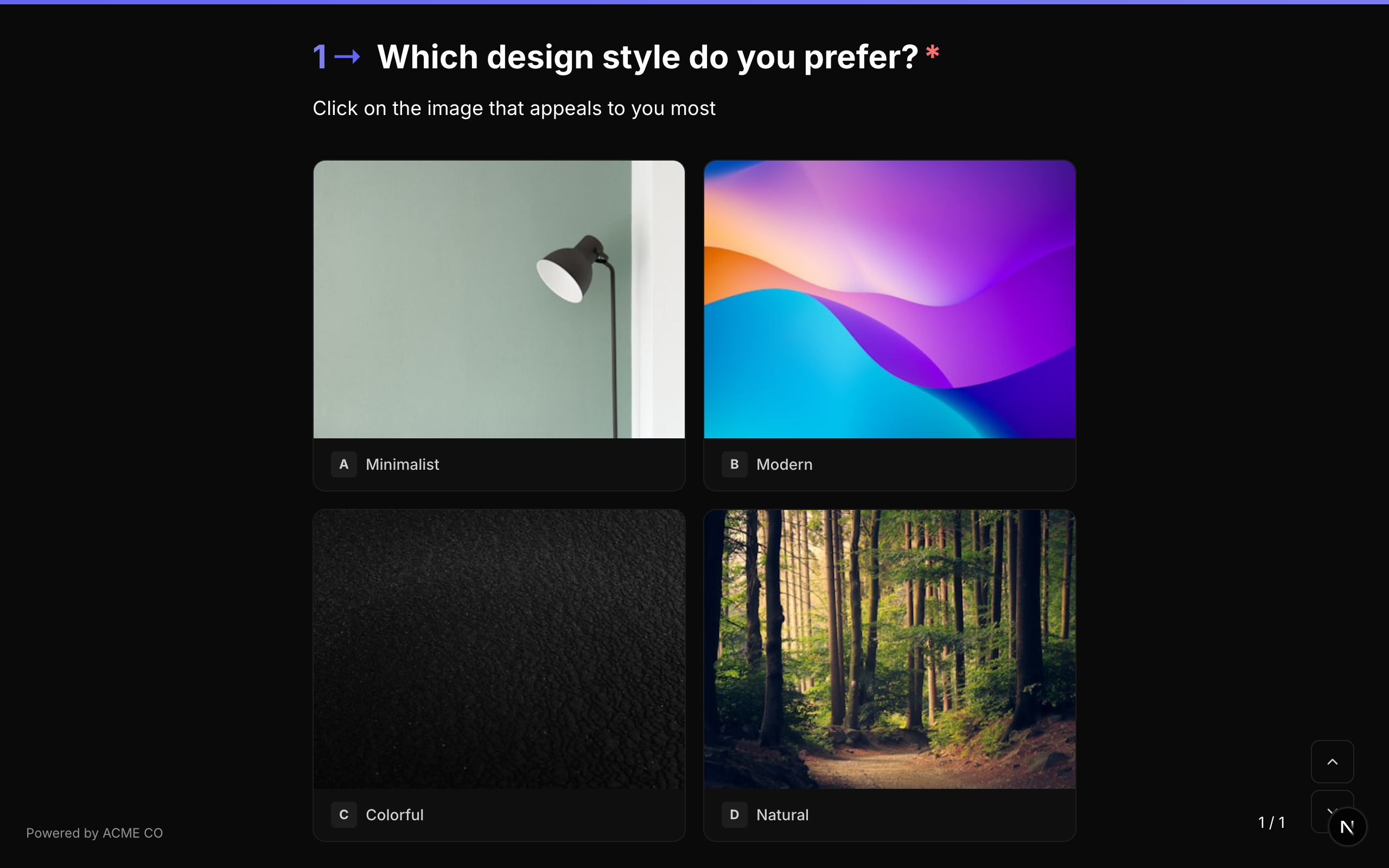
وسائط الخيار هي ما تحوّل إليه نوع السؤال السابق اختيار الصور. لبناء شبكة بطاقات صور، استخدم الاختيار المتعدد مع layout: "blocks" وأعطِ كل خيار كائن media. تُحوَّل النماذج المستوردة من Typeform أسئلةَ picture_choice إلى هذه الصيغة تلقائيًا.
التحقق
إذا كان required صحيحًا، يجب على المستجيب اختيار خيار واحد على الأقل قبل المتابعة.
معاملات القفز المنطقي
equals, not_equals, is_answered, is_not_answered
عند استخدام equals أو not_equals، قيمة المقارنة هي معرّف الخيار. للأسئلة متعددة الاختيار، equals يتحقق مما إذا كانت القيمة ضمن العناصر المحددة.
تنسيق الإجابة
- اختيار مفرد (
allowMultiple: false): سلسلة نصية (معرّف الخيار المحدد). - اختيار متعدد (
allowMultiple: true): مصفوفة سلاسل نصية (معرّفات الخيارات المحددة).
تسجيل وضع الاختبار
الاختيار المتعدد هو نوع سؤال قابل للتسجيل في جميع أوضاع الاختبار:
- اختبار المعرفة: عيّن
correctAnswers(مصفوفة معرّفات الخيارات الصحيحة) وcorrectAnswerScore(النقاط لكل إجابة صحيحة). - تأهيل العملاء المحتملين: عيّن
choiceScores(ربط معرّف الخيار بقيمة النقاط). - اختبار المطابقة: عيّن
choiceOutcomes(ربط معرّف الخيار بمعرّفات أسئلة شاشة النهاية).
تتوفر اختصارات لوحة المفاتيح لتحديد الخيارات. يمكن للمستجيبين الضغط على مفاتيح الأحرف (A, B, C, إلخ.) لتحديد الخيارات، والتي تظهر كمؤشرات بجانب كل خيار.
القائمة المنسدلة
قائمة منسدلة للاختيار من قائمة خيارات. تدعم نفس إعدادات الاختيار المتعدد لكن تعرض الخيارات بتنسيق قائمة منسدلة مدمجة. لا تنطبق هنا خاصية media لكل خيار ولا layout — تعرض القائمة المنسدلة خياراتها دائمًا كنص عادي.
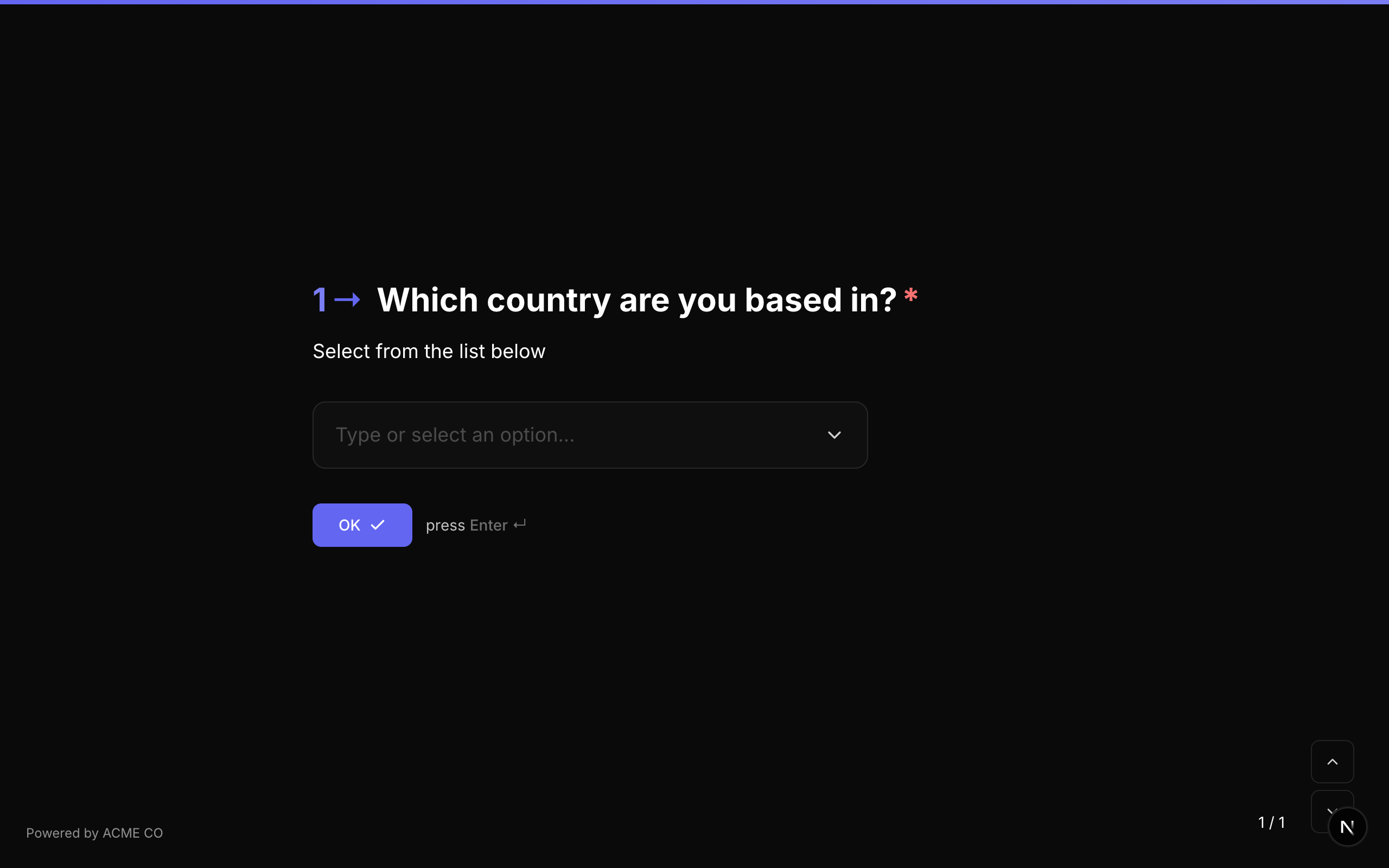
معرّف النوع: dropdown
الخصائص
| الخاصية | النوع | الوصف | الافتراضي |
|---|---|---|---|
choices | Choice[] | مصفوفة خيارات الاختيار. | [] |
allowMultiple | boolean | السماح بتحديد خيارات متعددة من القائمة المنسدلة. | false |
allowOther | boolean | عرض خيار "أخرى" مع إدخال نص حر. | false |
placeholder | string | نص توضيحي يُعرض قبل إجراء التحديد. | بدون |
randomize | boolean | ترتيب الخيارات عشوائيًا. | false |
alphabeticalOrder | boolean | ترتيب الخيارات أبجديًا. | false |
choiceSource | string | مصدر الخيارات: fixed يستخدم choices، وvariable يحمّلها من متغيّر. راجع قسم «الخيارات من متغيّر» أدناه. | fixed |
التحقق
إذا كان required صحيحًا، يجب على المستجيب اختيار خيار واحد على الأقل.
معاملات القفز المنطقي
equals, not_equals, is_answered, is_not_answered
تنسيق الإجابة
- اختيار مفرد: سلسلة نصية (معرّف الخيار المحدد).
- اختيار متعدد: مصفوفة سلاسل نصية (معرّفات الخيارات المحددة).
تسجيل وضع الاختبار
القائمة المنسدلة نوع سؤال قابل للتسجيل. إعداد التسجيل مطابق للاختيار المتعدد.
اختيار الصور
لم يعد اختيار الصور نوع سؤال منفصلًا. لقد دُمج في الاختيار المتعدد — ولم يعد هناك معرّف picture_choice يمكن اختياره.
لبناء الشيء نفسه، استخدم سؤال اختيار متعدد مع ضبط layout على blocks وكائن media لكل خيار. كل ما كان يفعله اختيار الصور ما زال متاحًا، بالإضافة إلى معالجات لم تكن متوفرة فيه من قبل: خيارات المقاطع المرئية والأيقونات، والفلاتر، والصبغة، ونقطة التركيز، والتكبير، ووضع الاحتواء الذي يعرض الصور العريضة كاملة بدل اقتصاصها.
{
  "type": "multiple_choice",
  "properties": {
    "layout": "blocks",
    "choices": [
      { "id": "c1", "label": "Mountains", "media": { "type": "image", "url": "https://…", "display": "background" } },
      { "id": "c2", "label": "Coast", "media": { "type": "image", "url": "https://…", "display": "background" } }
    ]
  }
}
النماذج الحالية والاستيرادات من Typeform مُعالَجة نيابة عنك — يُحوَّل سؤال picture_choice تلقائيًا إلى اختيار متعدد مع layout: "blocks"، فلا حاجة لإعادة تأليف أي شيء.
نعم / لا
سؤال ثنائي بسيط يقدم زري "نعم" و "لا".
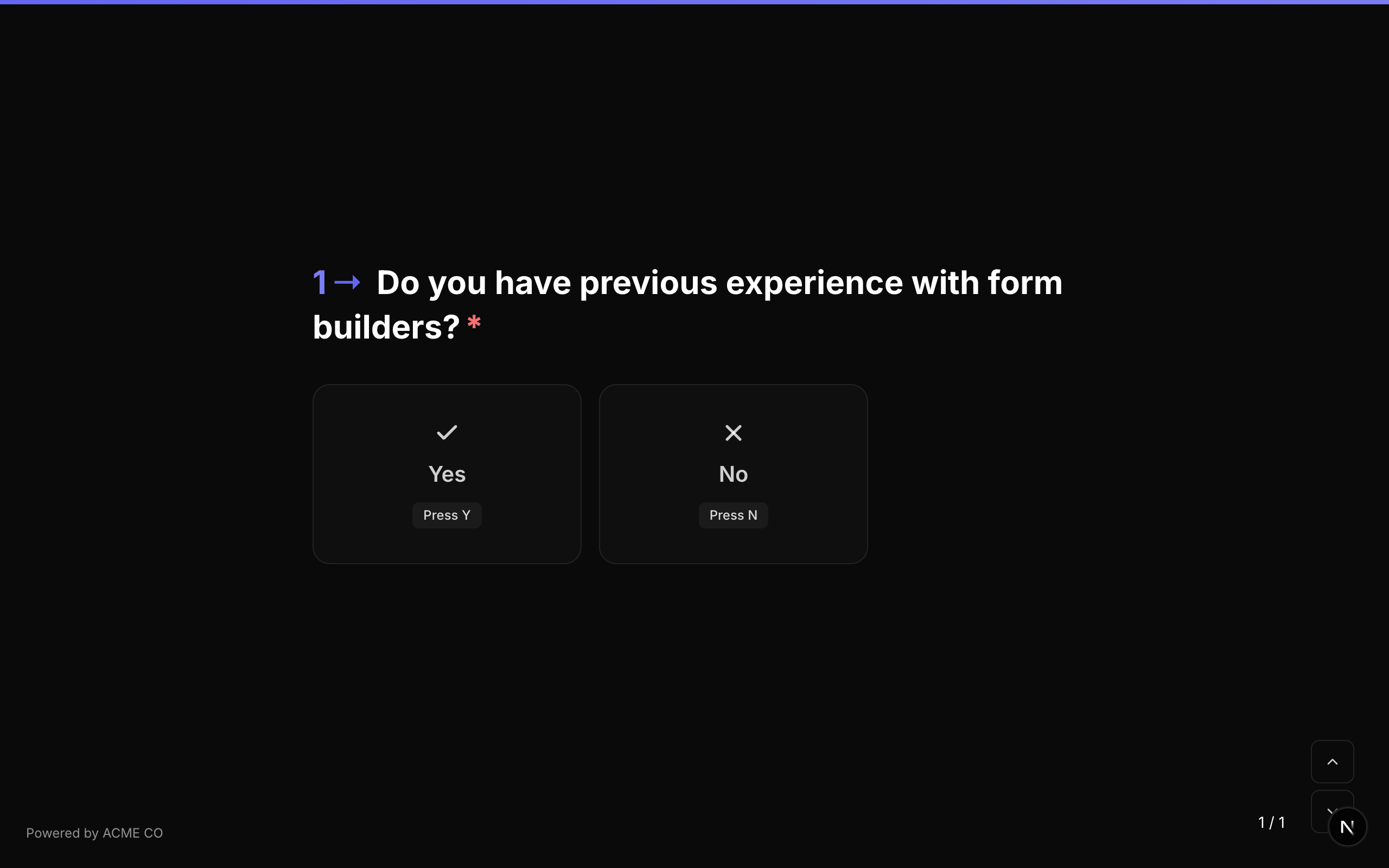
معرّف النوع: yes_no
الخصائص
لا يحتوي نوع سؤال نعم/لا على خصائص إضافية بخلاف خصائص السؤال المشتركة.
التحقق
إذا كان required صحيحًا، يجب على المستجيب النقر على "نعم" أو "لا".
معاملات القفز المنطقي
equals, not_equals, is_answered, is_not_answered
عند استخدام equals، قارن مع true (نعم) أو false (لا). القيم النصية "true" و "false" مقبولة أيضًا.
تنسيق الإجابة
تُخزن الإجابة كـ قيمة منطقية (true لنعم، false للا، أو null إذا لم تُجب).
تسجيل وضع الاختبار
نعم/لا نوع سؤال قابل للتسجيل:
- اختبار المعرفة: عيّن
correctAnswersبقيمة واحدة"true"أو"false". - تأهيل العملاء المحتملين: عيّن
choiceScoresبمفاتيح"true"و"false". - اختبار المطابقة: عيّن
choiceOutcomesبمفاتيح"true"و"false".
يتقدم سؤال نعم/لا تلقائيًا إلى السؤال التالي فور التحديد. لا يوجد زر "موافق" منفصل.
الترتيب
قدم قائمة عناصر للمستجيب لترتيبها حسب تفضيله بالسحب والإفلات.
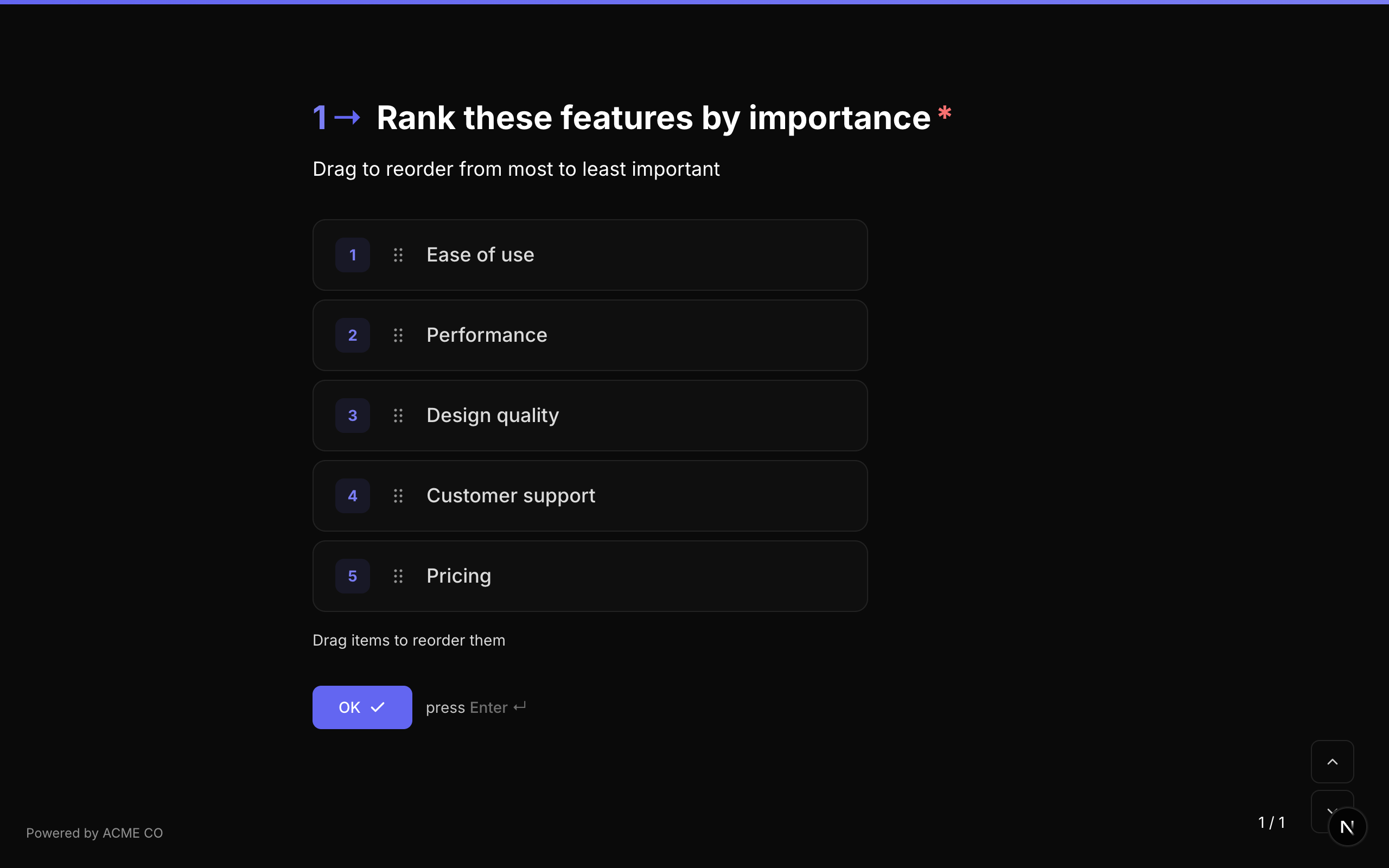
معرّف النوع: ranking
الخصائص
| الخاصية | النوع | الوصف | الافتراضي |
|---|---|---|---|
choices | Choice[] | مصفوفة عناصر للترتيب. لكل منها id و label. | [] |
choiceSource | string | مصدر العناصر: fixed يستخدم choices، وvariable يحمّلها من متغيّر. راجع قسم «الخيارات من متغيّر» أدناه. | fixed |
التحقق
إذا كان required صحيحًا، يجب على المستجيب إرسال ترتيب (جميع العناصر يجب أن تكون في ترتيب محدد).
معاملات القفز المنطقي
equals, not_equals, is_answered, is_not_answered
تنسيق الإجابة
تُخزن الإجابة كـ مصفوفة سلاسل نصية (معرّفات الخيارات بترتيب المستجيب المفضل، من الأول إلى الأخير).
["choice_3", "choice_1", "choice_2"]
يستخدم حقل الترتيب تفاعل السحب والإفلات. على الأجهزة المحمولة، يمكن للمستجيبين استخدام إيماءات اللمس لإعادة ترتيب العناصر.
المصفوفة
نوع سؤال شبكي حيث يقيّم المستجيبون عناصر متعددة (صفوف) عبر فئات متعددة (أعمدة). كل تقاطع صف-عمود هو خيار قابل للتحديد.
معرّف النوع: matrix
الخصائص
| الخاصية | النوع | الوصف | الافتراضي |
|---|---|---|---|
rows | string[] | مصفوفة تسميات الصفوف (العناصر المُقيّمة). | [] |
columns | string[] | مصفوفة تسميات الأعمدة (فئات التقييم). | [] |
randomizeRows | boolean | ترتيب الصفوف عشوائيًا. | false |
randomizeColumns | boolean | ترتيب الأعمدة عشوائيًا. | false |
rowSource | string | مصدر الصفوف: fixed يستخدم rows، وvariable يحمّلها من متغيّر. راجع قسم «الخيارات من متغيّر» أدناه. | fixed |
columnSource | string | مصدر الأعمدة: fixed يستخدم columns، وvariable يحمّلها من متغيّر. | fixed |
التحقق
إذا كان required صحيحًا، يجب على المستجيب تحديد خيار واحد لكل صف.
معاملات القفز المنطقي
equals, not_equals, is_answered, is_not_answered
تنسيق الإجابة
تُخزن الإجابة ككائن object (Record<string, string>) يربط كل تسمية صف بتسمية العمود المحدد:
{
  "Product Quality": "Excellent",
  "Customer Service": "Good",
  "Value for Money": "Average"
}
تُعرض أسئلة المصفوفة كشبكة متجاوبة على سطح المكتب وتتكيف مع تنسيق متراكم على الأجهزة المحمولة لسهولة الاستخدام. تدعم الصفوف والأعمدة ترتيبًا عشوائيًا مستقلًا.
القائمة
اجمع عدة إدخالات من النوع نفسه. تحتوي القائمة إما على عناصر نصية عادية (اكتب واضغط Enter، أو انقر على إضافة) أو عناصر مركّبة متكررة — إدخالات منظمة مبنية من مركّب قابل لإعادة الاستخدام، مثل إضافة أي عدد من أعضاء مجلس الإدارة إلى سؤال واحد.
معرّف النوع: list
الخصائص
| الخاصية | النوع | الوصف | الافتراضي |
|---|---|---|---|
itemType | string | string للعناصر النصية العادية، composite للنسخ المركّبة القابلة للتكرار. | string |
compositeId | string | المركّب المُشار إليه (العناصر المركّبة فقط). يُعيَّن عبر المنتقي. | — |
itemPlaceholder | string | نص توضيحي لإدخال العنصر (العناصر النصية). | — |
addButtonLabel | string | تسمية مخصصة لزر الإضافة في كلا وضعي العنصر. | — |
minItems | number | الحد الأدنى لعدد العناصر المطلوبة للإرسال. | — |
maxItems | number | الحد الأقصى لعدد العناصر. حد أقصى صارم 100. | 100 |
itemRegex | string | نمط التحقق لكل عنصر (العناصر النصية). | — |
itemRegexError | string | رسالة الخطأ المعروضة عند فشل النمط. | — |
itemMinLength | number | الحد الأدنى للأحرف لكل عنصر (العناصر النصية). | — |
itemMaxLength | number | الحد الأقصى للأحرف لكل عنصر (العناصر النصية). | — |
allowDuplicates | boolean | السماح بإضافة العنصر النصي نفسه مرتين (العناصر النصية). | true |
allowReorder | boolean | السماح للمستجيبين بسحب العناصر لإعادة ترتيبها (العناصر النصية). | true |
defaultItems | string[] | عناصر مملوءة مسبقًا في أول مرة يُحمّل فيها السؤال (العناصر النصية، نماذج الويب). | [] |
displayMode | string | كيفية عرض الإدخال المركّب المطوي: compact (ملخص بسطر واحد) أو card (تسمية وقيمة كل حقل). | compact |
compactFields | string[] | معرّفات الحقول الفرعية المرتبة المعروضة في الملخص المضغوط المطوي. تُعيَّن افتراضيًا إلى الحقل الأول للمركّب. | — |
التحقق
إذا كان required صحيحًا، يجب إضافة عنصر واحد على الأقل. تُفرض minItems / maxItems عند الإرسال؛ وتُفرض قواعد النمط والطول لكل عنصر (العناصر النصية) عند إضافة كل عنصر.
معاملات القفز المنطقي
list_count_equals, list_count_greater_than, list_count_less_than, contains, not_contains, is_answered, is_not_answered
تقارن معاملات العدد مع عدد العناصر في الإجابة.
تنسيق الإجابة
- العناصر النصية: مصفوفة سلاسل نصية.
- العناصر المركّبة: مصفوفة كائنات، كل منها مفهرس بمعرّف الحقل الفرعي:
[
  { "sub_first_name": "Ada", "sub_email": "ada@example.com" },
  { "sub_first_name": "Grace", "sub_email": "grace@example.com" }
]
يُسجَّل كل عنصر مركّب أيضًا كـ إدخال مركّب مستقل — راجع دليل المركّبات لعرض الإدخالات عبر النماذج وأوضاع العرض المطوي.
الخيارات من متغيّر
يمكن لأسئلة الاختيار المتعدد والقائمة المنسدلة والترتيب أن تحمّل خياراتها من متغيّر بدلًا من قائمة ثابتة — وعادةً ما يكون ذلك استجابة عقدة بيانات تستدعي واجهتك البرمجية (API). ويمكن للمصفوفة أن تفعل الشيء نفسه مع صفوفها أو أعمدتها أو كليهما.
الإعداد
- أضف عقدة بيانات تُرجع القائمة، وحدّد لها متغير الاستجابة — مثل
breeds. - في إعدادات السؤال، غيّر مصدر الخيارات من قائمة ثابتة (الإعداد الافتراضي) إلى من متغيّر. وفي المصفوفة، استخدم مصدر الصفوف ومصدر الأعمدة.
- أدخل المتغيّر الذي يحتوي على القائمة:
{breeds}، أو مسارًا داخل الاستجابة مثل{breeds.data}. - إذا كانت عناصرك لا تستخدم المفتاحين
labelوvalue، فافتح هل تستخدم عناصرك أسماء حقول أخرى؟ وأدخل حقل التسمية وحقل القيمة اللذين تستخدمهما بياناتك.
في النموذج بنمط NueForm، ضع عقدة البيانات قبل السؤال. وفي النموذج بنمط الاستبيان، اضبط وقت التشغيل لعقدة البيانات على إبقاؤه محدّثًا كي تتبع القائمة إجابات المستجيب — راجع نمط الاستبيان.
لا تتوفر إعدادات المصدر هذه إلا للأسئلة الموضوعة مباشرة في النموذج. فلا يعرضها المُنشئ لسؤال داخل مجموعة أسئلة أو صفحة أسئلة متعددة أو مركّب، لأن هذه الأسئلة تحفظ إجابتها داخل إجابة العنصر الذي يحتويها، حيث لا يمكن الاحتفاظ بالتسميات. أما السؤال الذي يحمّل خياراته من متغيّر بالفعل فيحتفظ بالإعداد إذا نقلته إلى أحدها، لكن استجاباته تعرض حينها قيم العناصر بدلًا من تسمياتها.
وعلى لوحة المُنشئ، يعرض السؤال «خيارات من {breeds}» بدلًا من خياراته.
الصيغ المقبولة
يجب أن يحتوي المتغيّر على قائمة JSON — إما من نصوص بسيطة، يكون كل نص فيها هو التسمية والقيمة معًا:
["Siamese", "Persian"]
وإما من كائنات لها تسمية وقيمة:
[
  { "label": "Siamese", "value": "siamese" },
  { "label": "Persian", "value": "persian" }
]
وتعمل أيضًا الكائنات التي تستخدم مفاتيح أخرى — حدّد تلك المفاتيح في حقل التسمية وحقل القيمة. بالنسبة إلى الاستجابة التالية، استخدم المتغيّر {breeds.data}، وحقل التسمية name، وحقل القيمة id:
{ "data": [{ "name": "Siamese", "id": "siamese" }, { "name": "Persian", "id": "persian" }] }
وفي الاختيار المتعدد، يمكن للعنصر أيضًا أن يحمل عنوان URL في المفتاح image، فيصبح صورة ذلك الخيار:
[{ "label": "Siamese", "value": "siamese", "image": "https://example.com/siamese.jpg" }]
إذا كانت الاستجابة كائنًا، فأشِر إلى القائمة داخله بمسار نقطي مثل {breeds.data}. وإذا كان المفتاح ليس كلمة بسيطة، فاستخدم {breeds["the list"]}.
كيف تُقرأ العناصر
- تصبح قيمة كل عنصر هي معرّف الخيار الخاص به. وهي ما تخزّنه الإجابة، وما تقارنه الشروط المنطقية، وما يطابقه تسجيل نقاط الاختبار.
- إذا كان للكائن تسمية فقط أو قيمة فقط، فتُستخدم لكليهما. وتُقرأ الأرقام و
true/falseكنص. - تُتخطّى العناصر التي ليست لها قيمة، أو التي تكرر قيمة عنصر سابق، وكذلك القيم التي تتجاوز 500 حرف. وتُختصر التسميات التي تتجاوز 500 حرف، ولا يُستخدم إلا أول 1,000 عنصر.
- تُعرض التسميات كنص عادي: لا يُطبَّق عليها أي تنسيق، ولا تُستبدل رموز
{variable}الموجودة فيها. - لا يزال خيار «أخرى» يعمل في الاختيار المتعدد والقائمة المنسدلة: ويظهر بعد العناصر المحمَّلة.
- تنطبق إعدادات السؤال الأخرى — مثل السماح بتحديدات متعددة وترتيب عشوائي وترتيب أبجدي — على العناصر المحمَّلة كالمعتاد.
- تحتفظ عقدة البيانات بما يصل إلى 4,096 حرفًا من استجابتها، لذا قد تصل القائمة الطويلة مقطوعة. راجع قسم «استجابات عُقد البيانات كقوائم خيارات» في المتغيرات.
ما يراه المستجيبون
لا توجد قائمة ثابتة احتياطية. فإلى أن يحتوي المتغيّر على قائمة صالحة للاستخدام، يعرض السؤال إحدى الرسائل الثلاث الأولى أدناه بدلًا من الخيارات. أما الرسالة الأخيرة فتظهر فوق الخيارات بعد أن تتغيّر القائمة:
| الرسالة | متى تظهر |
|---|---|
| جارٍ تحميل الخيارات… | عقدة البيانات التي تملأ القائمة قيد التشغيل. |
| ستظهر الخيارات بعد الإجابة عن الأسئلة أعلاه. | المتغيّر لا يزال فارغًا — وعادةً لأن عقدة البيانات تنتظر إجابة. |
| تعذّر تحميل هذه الخيارات. | المتغيّر لا يحتوي على قائمة صالحة للاستخدام. وتوضح لك معاينة المُنشئ السبب أيضًا. |
| تم التحديث بناءً على إجابتك السابقة. | تغيّرت القائمة ولم يعد أحد الخيارات التي حدّدها المستجيب معروضًا، لذلك مُسح. |
الإجابات المحفوظة
- تخزّن الإجابة قيم العناصر، تمامًا مثل معرّفات الخيارات. وفي المصفوفة، تربط الإجابة قيمة كل صف بقيمة العمود المختار.
- تُحفظ التسميات التي رآها المستجيب مع الإجابة، لذا تعرض الردود وملفات CSV المُصدَّرة ورسائل الإشعار التسميات بدلًا من القيم.
- تُرسل الـ Webhooks القيم ومعها خريطة
valueLabelsتربط كل قيمة مختارة بتسميتها، سواء في الإرسالات عبر الويب أو عبر المكالمات الهاتفية. - تُحمَّل القائمة أثناء تعبئة المستجيب للنموذج، لذلك لا يعيد NueForm التحقق من القيم المُرسَلة مقابلها. ولا تزال الأسئلة الإلزامية مفروضة. وإذا كان يجب أن تكون الإجابة أحد عناصرك، فتحقّق من ذلك في نظامك عند معالجة الاستجابة.
التسجيل والشروط
- التسجيل: لا توجد قائمة ثابتة لتحديدها، لذا يطلب محرر التسجيل قيم العناصر بدلًا منها، ويجب أن تتطابق تمامًا («يطابق قيمة العنصر تمامًا.»). راجع قسم «تسجيل نقاط الخيارات من متغيّر» في أوضاع النموذج.
- الشروط: تستخدم القفزات المنطقية وشروط الرؤية لهذه الأسئلة المُشغّلات النصية وقيمة مكتوبة. وفي المصفوفة، لا يعرض محرر الشروط إلا
is_answeredوis_not_answered، لأن إجابتها تربط الصفوف بالأعمدة. راجع قسم «الشروط على الخيارات من متغيّر» في القفزات المنطقية. - المكالمات الهاتفية: يقرأ الوكيل جميع خيارات القائمة، ويمكن للمتصل أن ينطق خيارًا أو يضغط رقمه. راجع قسم «الخيارات من متغيّر» في الهاتف.
خصائص المصدر
| الخاصية | النوع | الوصف | الافتراضي |
|---|---|---|---|
choiceSource | string | fixed يستخدم choices. أما variable فيحمّل الخيارات من choiceVariable، ويُتجاهل choices. | fixed |
choiceVariable | string | المتغيّر الذي يحتوي على القائمة، مثل {breeds} أو {breeds.data}. | — |
choiceLabelField | string | للعناصر التي هي كائنات: المفتاح الذي يحمل تسمية كل عنصر. | label |
choiceValueField | string | للعناصر التي هي كائنات: المفتاح الذي يحمل قيمة كل عنصر. | value |
وللمصفوفة المجموعة نفسها لكل محور: rowSource وrowVariable وrowLabelField وrowValueField، وcolumnSource وcolumnVariable وcolumnLabelField وcolumnValueField.