
Legal / Terms
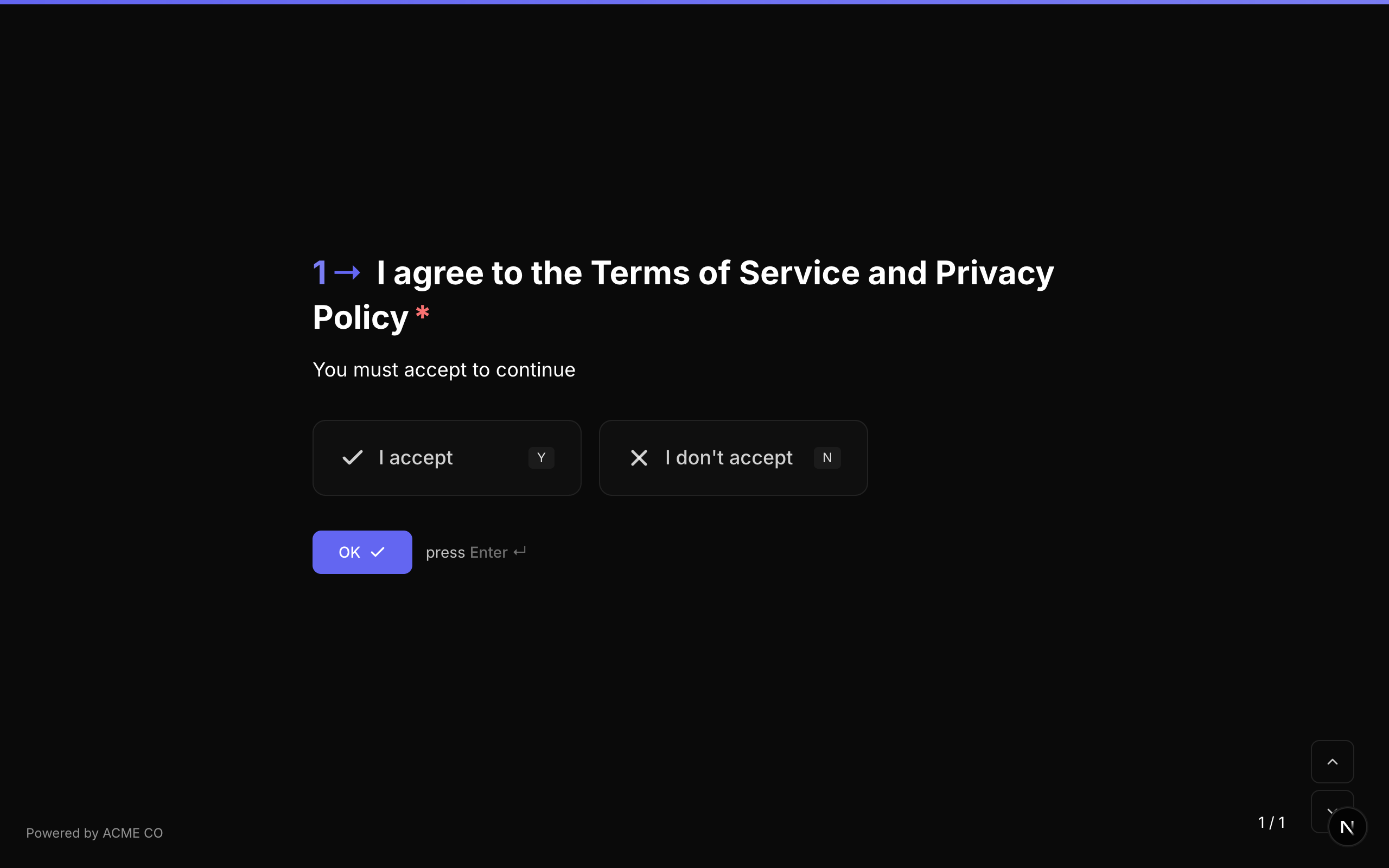
एक terms and conditions acceptance question जो statement present करता है और respondent से accept या decline करने की आवश्यकता होती है।
Type identifier: legal
Properties
| Property | Type | विवरण | Default |
|---|---|---|---|
buttonText | string | Display होने वाला legal text या terms। यह उस legal agreement का text है जिसे respondent accept कर रहा है। | None |
Behavior
buttonTextसे legal text display होता है।- Respondent "I accept" या "I don't accept" click करता है।
- Typically privacy policies, terms of service, consent forms, और data processing agreements के लिए उपयोग होता है।
Validation
यदि required true है, respondent को आगे बढ़ने के लिए terms accept करने होंगे। Required question पर decline करने ("I don't accept" select करने) पर validation error दिखाई देगा।
Logic Jump Operators
equals, not_equals, is_answered, is_not_answered
equals उपयोग करते समय, true (accepted) या false (declined) से compare करें।
Answer Format
Answer एक boolean (true accept के लिए, false decline के लिए, या unanswered होने पर null) के रूप में store होता है।
Quiz Mode Scoring
Legal एक scorable question type है:
- Knowledge Quiz:
correctAnswersको"true"या"false"के साथ set करें। - Lead Qualification:
choiceScoresको"true"और"false"keys के साथ set करें। - Match Quiz:
choiceOutcomesको acceptance/decline से end screens में mapping set करें।
Legal question type functionally Yes/No के समान है लेकिन विशेष रूप से terms and conditions scenarios के लिए designed है। UI "Yes" / "No" की बजाय "I accept" / "I don't accept" buttons present करता है।
Payment
Stripe integration का उपयोग करके form flow के हिस्से के रूप में respondents से payments collect करें। दो payment modes, configurable currencies, और fixed या variable amounts support करता है।
Type identifier: payment
Payment Modes
| Mode | Plans | विवरण |
|---|---|---|
platform | All plans | NueForm payments process करता है और आपको funds transfer करता है। प्रति transaction 2.9% + $0.30 fee। |
connect | Pro, Enterprise | Payments सीधे आपके connected Stripe account में जाते हैं। कोई NueForm fees नहीं। |
Properties
| Property | Type | विवरण | Default |
|---|---|---|---|
price | number | Major units में fixed payment amount (जैसे, 29.99)। Variable amounts के लिए खाली छोड़ें। | None |
currency | string | Currency code (जैसे, "USD", "EUR", "GBP")। | "usd" |
paymentMode | string | Payment mode: "platform" या "connect"। | "platform" |
paymentDescription | string | Stripe charge पर दिखाई देने वाला description। | None |
paymentButtonText | string | Pay button के लिए custom text। | "Pay $X.XX" |
minAmount | number | Variable payments के लिए minimum allowed amount (major units)। | None |
maxAmount | number | Variable payments के लिए maximum allowed amount (major units)। | None |
stripeConnectionId | string | उपयोग किए जाने वाले connected Stripe account की ID। | None |
enableTracking | boolean | Cumulative payment totals track करें। | false |
paymentAccountId | string | Payment tracking account ID। | None |
accountTotalVariable | string | Running account total store करने के लिए variable name। | None |
Behavior
- यदि
priceset है, respondent fixed amount देखता है और card details provide करता है। - यदि
priceset नहीं है, respondent अपना amount enter करता है (variable/donation mode)। - Secure card collection के लिए Stripe Payment Element render होता है।
- Successful payment पर, form अगले question पर auto-advance करता है।
- Respondents question के published version से pay करते हैं: उसका price, minimum और maximum, currency, Stripe account, payment mode, description और payment tracking। नया price या Stripe account, किसी भी दूसरे change की तरह, form publish करने पर लागू होता है। Builder preview आपके draft का price charge करता है।
Validation
यदि required true है, respondent को आगे बढ़ने के लिए payment complete करना होगा।
Logic Jump Operators
equals, not_equals, is_answered, is_not_answered
Answer Format
Answer एक PaymentResult object के रूप में store होता है:
{
  "paymentIntentId": "pi_abc123",
  "amount": 2999,
  "currency": "usd",
  "status": "succeeded"
}
Setup instructions के लिए, Collect Payments how-to guide देखें।
Date
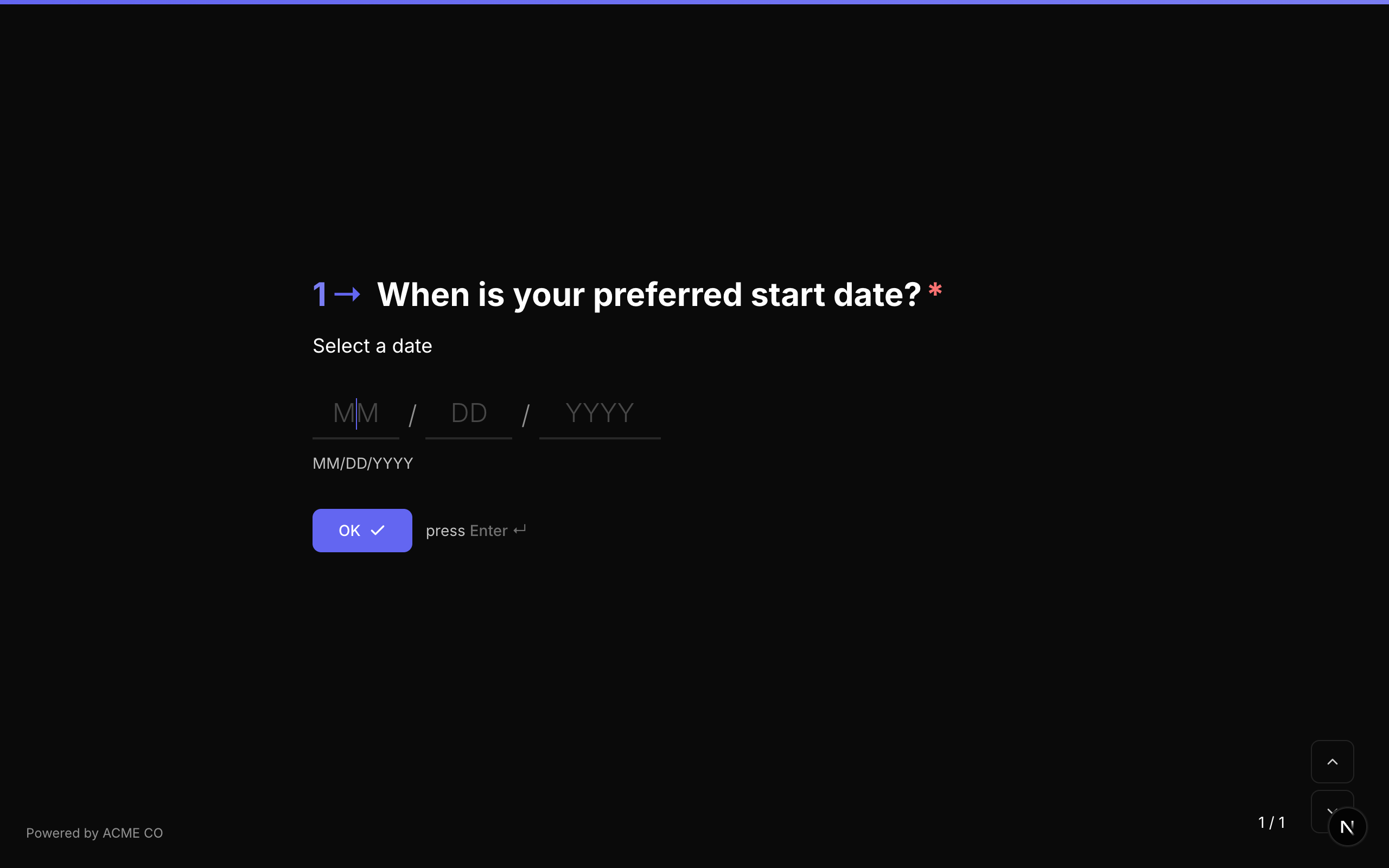
Respondents को date select करने की अनुमति देने वाला date picker। Configurable date formats support करता है।
Type identifier: date
Properties
| Property | Type | विवरण | Default |
|---|---|---|---|
dateFormat | string | वह format जिसमें date display और parse होती है (जैसे, "MM/DD/YYYY", "DD/MM/YYYY", "YYYY-MM-DD")। | System default |
Behavior
- Date picker interface display होता है।
- Respondent manually date type कर सकता है या calendar widget से select कर सकता है।
- Display format से स्वतंत्र, date ISO format में store होती है।
Validation
यदि required true है, respondent को date select करनी होगी।
| Rule | विवरण |
|---|---|
min | Minimum allowed date। |
max | Maximum allowed date। |
customMessage | Date validation के लिए custom error message। |
Logic Jump Operators
equals, not_equals, is_answered, is_not_answered
Answer Format
Answer एक string (date value, typically ISO format या configured dateFormat में) के रूप में store होता है।
Ranking
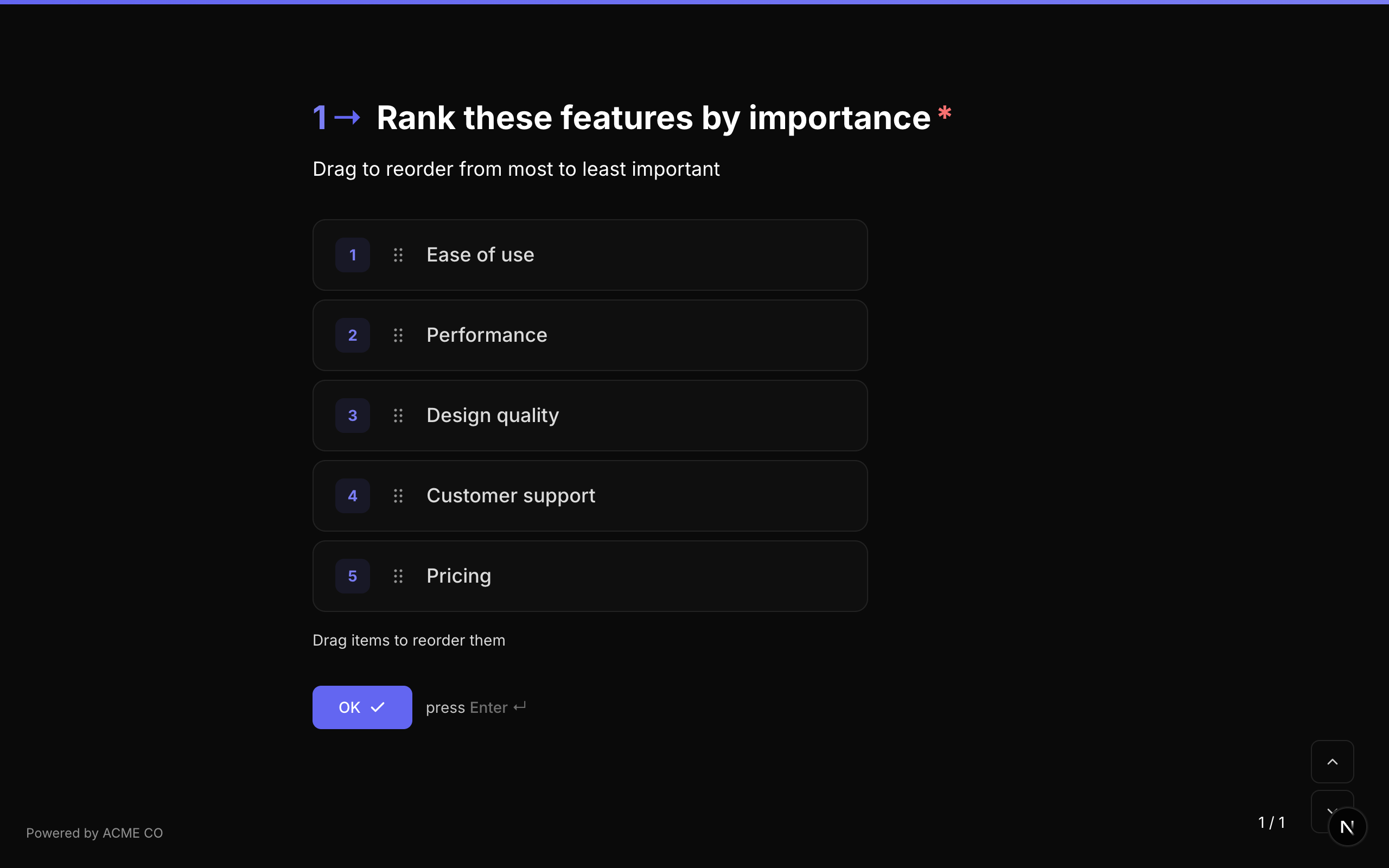
Respondent को drag and drop करके preferred order में arrange करने के लिए items की list present करें।
Type identifier: ranking
Properties
| Property | Type | विवरण | Default |
|---|---|---|---|
choices | Choice[] | Rank करने के लिए items का array। प्रत्येक में id और label है। | [] |
choiceSource | string | Items कहाँ से आते हैं: fixed choices का उपयोग करता है; variable उन्हें एक variable से load करता है। Variable से Choices देखें। | fixed |
Behavior
- Items list में display होते हैं।
- Respondent items reorder करने के लिए drag करता है।
- Drag handles draggable items indicate करते हैं।
- Touch और mouse interaction दोनों supported हैं।
Validation
यदि required true है, respondent को ranking submit करनी होगी।
Logic Jump Operators
equals, not_equals, is_answered, is_not_answered
Answer Format
Answer एक array of strings (respondent के ranked order में choice IDs) के रूप में store होता है।
Matrix
एक grid-based question type जहां respondents multiple items को multiple categories में rate करते हैं।
Type identifier: matrix
Properties
| Property | Type | विवरण | Default |
|---|---|---|---|
rows | string[] | Row labels का array (rate किए जा रहे items)। | [] |
columns | string[] | Column labels का array (rating categories)। | [] |
randomizeRows | boolean | Rows का order randomize करें। | false |
randomizeColumns | boolean | Columns का order randomize करें। | false |
rowSource | string | Rows कहाँ से आती हैं: fixed rows का उपयोग करता है; variable उन्हें एक variable से load करता है। Variable से Choices देखें। | fixed |
columnSource | string | Columns कहाँ से आते हैं: fixed columns का उपयोग करता है; variable उन्हें एक variable से load करता है। | fixed |
Behavior
- Grid rows left side पर और columns top पर display होता है।
- Respondent प्रति row एक option select करता है।
- Mobile पर, grid बेहतर usability के लिए stacked format में adapt होता है।
Validation
यदि required true है, respondent को हर row के लिए option select करना होगा।
Logic Jump Operators
equals, not_equals, is_answered, is_not_answered
Answer Format
Answer एक object के रूप में store होता है जो row labels को selected column labels से map करता है:
{
  "Quality": "Excellent",
  "Speed": "Good",
  "Support": "Average"
}
Contact Info
एक ही question में name, email address, और phone number सहित structured contact information collect करें।
Type identifier: contact_info
Properties
| Property | Type | विवरण | Default |
|---|---|---|---|
defaultCountryCode | string | Phone field के लिए default country code (जैसे, "US", "GB")। | None |
Behavior
- First Name, Last Name, Email, और Phone Number के लिए fields display होते हैं।
- Phone field में country code selector शामिल है।
- प्रत्येक sub-field individually required या optional हो सकता है।
Validation
यदि required true है, सभी visible sub-fields complete होने चाहिए।
Logic Jump Operators
equals, not_equals, is_answered, is_not_answered
Answer Format
Answer एक object के रूप में store होता है:
{
  "firstName": "Jane",
  "lastName": "Smith",
  "email": "jane@example.com",
  "phone": "+14155551234"
}
Address
Google Places द्वारा powered optional autocomplete के साथ पूर्ण mailing address collect करें।
Type identifier: address
Properties
| Property | Type | विवरण | Default |
|---|---|---|---|
enableAddressAutocomplete | boolean | Address lookup के लिए Google Places autocomplete enable करें। | false |
Behavior
- Street address, city, state/province, postal code, और country के लिए fields display होते हैं।
- Autocomplete enabled होने पर, street field में type करने पर address suggestions दिखाई देते हैं।
- Suggestion select करने पर सभी address fields auto-fill हो जाते हैं।
Validation
यदि required true है, सभी address fields complete होने चाहिए।
Logic Jump Operators
equals, not_equals, is_answered, is_not_answered
Answer Format
Answer एक object के रूप में store होता है:
{
  "street": "123 Main St",
  "city": "San Francisco",
  "state": "CA",
  "postalCode": "94105",
  "country": "US"
}
Data Node
एक invisible question type जो form flow के दौरान HTTP API calls करता है। Data Nodes respondents को render नहीं होते -- ये स्वचालित रूप से execute होते हैं और data fetch, answers validate, या external actions trigger कर सकते हैं।
Type identifier: data_node
Properties
| Property | Type | विवरण | Default |
|---|---|---|---|
dataNodeUrl | string | Call करने के लिए URL। {variable} interpolation support करता है। | None |
dataNodeMethod | string | HTTP method: "GET", "POST", "PUT", "DELETE"। | "GET" |
dataNodeHeaders | string | Request headers की JSON string। {variable} interpolation support करती है। | "{}" |
dataNodeBody | string | Request body की JSON string। {variable} interpolation support करती है। | "" |
dataNodeResponseVariable | string | पूर्ण JSON response store करने के लिए variable name। | None |
dataNodeTimeout | number | Seconds में request timeout। | 10 |
dataNodeSilent | boolean | केवल NueForm style में: Fire-and-forget mode -- कोई loading screen नहीं दिखाई देती। | false |
dataNodeDebug | boolean | केवल NueForm style में: Request/response details के साथ debug panel दिखाएं। | false |
dataNodeLoadingText | string | केवल NueForm style में: Request के दौरान दिखाया जाने वाला custom loading text। | "Loading..." |
dataNodeValidation | boolean | केवल NueForm style में: Previous question के लिए validation gate के रूप में उपयोग करें। | false |
questionnaireRun | string | केवल Questionnaire style वाले forms: node कब चलता है — keepUpdated (अपडेट रखें) या onSubmit (एक बार, सबमिट करने पर)। Questionnaire Style में Data Node देखें। | अगर आगे का कोई question (उसकी choice list और conditions सहित) या आगे का कोई Data Node, जो ख़ुद keepUpdated हो, response variable का उपयोग करता है तो keepUpdated (email steps और onSubmit nodes नहीं गिने जाते), वरना onSubmit। Builder में जोड़ा गया node onSubmit से शुरू होता है। |
Behavior
- Form flow में पहुंचने पर स्वचालित रूप से execute होता है (NueForm style और phone calls)। Questionnaire style में कब चलाएँ setting तय करती है — नीचे देखें।
- URL, headers, और body में सभी
{variableName}tokens current variable values से replace होते हैं। - यदि
dataNodeResponseVariableset है, पूर्ण JSON response form variable के रूप में store होता है। - Silent mode में, request background में fire होती है बिना loading indicator के।
- Validation gate mode में, failing request previous question से progression block करती है।
Use Cases
- External data fetch करें: Form flow के दौरान product details, pricing, या user profiles look up करें।
- Answers validate करें: अपने database में email check करें, coupon code verify करें, या address validate करें।
- Actions trigger करें: Webhook को data भेजें, अपने CRM में record create करें, या workflow start करें।
Questionnaire Style में Data Node
Questionnaire सभी questions एक साथ दिखाता है, इसलिए ऐसा कोई पल नहीं होता जब respondent किसी Data Node तक "पहुँचे"। इसकी जगह उसकी कब चलाएँ setting तय करती है:
- अपडेट रखें — जब इसके इस्तेमाल किए गए answers बदलते हैं तब चलता है। Lookups के लिए सबसे अच्छा, जैसे किसी बाद वाले question के options load करना।
- एक बार, सबमिट करने पर — respondent के सबमिट करें पर click करने पर हमारे servers पर एक बार चलता है। Data भेजने के लिए सबसे अच्छा।
POST, PUT, PATCH या DELETE request के लिए अपडेट रखें चुनने पर एक warning दिखती है, क्योंकि हर बार उन answers के बदलने पर request फिर से चलेगी। Phone calls पर Data Nodes अब भी तब चलते हैं जब call उन तक पहुँचती है, form style चाहे जो हो। Details, default और builder के संकेतों के लिए प्रश्नावली शैली देखें।
Questionnaire style में builder साइलेंट मोड, डीबग मोड, वैलिडेशन के रूप में उपयोग करें और लोडिंग टेक्स्ट छिपा देता है: ये केवल NueForm style पर लागू होते हैं, और failed request कभी भी सबमिट करें को block नहीं करती। इनके values बने रहते हैं, इसलिए वापस NueForm style पर जाने पर ये लौट आते हैं।
Data Nodes respondents को invisible हैं। ये builder और workflow editor में दिखाई देते हैं लेकिन live form में skip होते हैं -- केवल API call execute होती है। Examples के लिए Data Nodes how-to guide देखें।
Composite
प्रश्नों का एक पुन: उपयोग योग्य, versioned बंडल embed करें — Composites page पर एक बार define किया गया और फ़ॉर्म में साझा किया गया। Respondents कंपोज़िट के सभी fields एक screen पर देखते हैं और उन्हें एक साथ submit करते हैं। बनाने, संपादित करने, publish करने, और प्रविष्टियाँ ट्रैक करने के लिए कंपोज़िट guide देखें।
Type identifier: composite_ref
Properties
| Property | Type | विवरण | Default |
|---|---|---|---|
compositeId | string | reference किया गया कंपोज़िट। question panel में picker के माध्यम से set होता है। | — |
fields | FormQuestion[] | Derived — कंपोज़िट के published sub-fields, फ़ॉर्म publish पर form snapshot में frozen। प्रश्न पर कभी सीधे edit नहीं किए जाते। | — |
Validation
जब respondent screen submit करता है तो required sub-fields एक साथ validate होते हैं।
Logic Jump Operators
प्रश्न पर ही is_answered, is_not_answered। Individual sub-answers को sub-field addressing (questionId.subFieldId) के माध्यम से किसी भी condition में target किया जा सकता है — sub-fields condition field picker में अपने parent के नीचे दिखाई देते हैं।
Answer Format
एक object जो sub-field ID द्वारा keyed होता है:
{ "sub_first_name": "Ada", "sub_title": "Director", "sub_email": "ada@example.com" }
Submission एक कंपोज़िट प्रविष्टि के रूप में भी record होती है, जो कंपोज़िट की प्रविष्टियाँ view में सभी फ़ॉर्म में दिखाई देती है।
किसी कंपोज़िट के fields edit करने से उसकी shared working copy बदल जाती है — इसे reference करने वाला हर फ़ॉर्म कंपोज़िट के publish होने और फ़ॉर्म के republish होने के बाद परिवर्तन अपना लेता है। canvas badge पर "ड्राफ़्ट" pill कंपोज़िट को वहीं publish करता है।
Common Advanced Features
Titles और Descriptions में Rich Text
सभी advanced question types अपने title और description fields में rich text support करते हैं। Rich text form builder में Tiptap-based editor के माध्यम से enter किया जाता है और निम्नलिखित support करता है:
- Bold, italic, underline, और
strikethrough - Links (
href,target,relattributes के साथ) - Ordered और unordered lists
- Inline code
- Subscript और superscript
- Inline styles के माध्यम से custom font families और colors
Rich text HTML के रूप में store होता है और tags और attributes की strict allowlist के साथ DOMPurify उपयोग करके rendering से पहले sanitize होता है।
Variable Substitution
सभी advanced question types अपने title और description fields में {variableName} substitution support करते हैं। Variables guide देखें।
Media Attachments
सभी advanced question types layout options की पूर्ण range के साथ media attachments (image, video, icon, QR code) support करते हैं। Creating Forms guide देखें।