
Legal / Terms
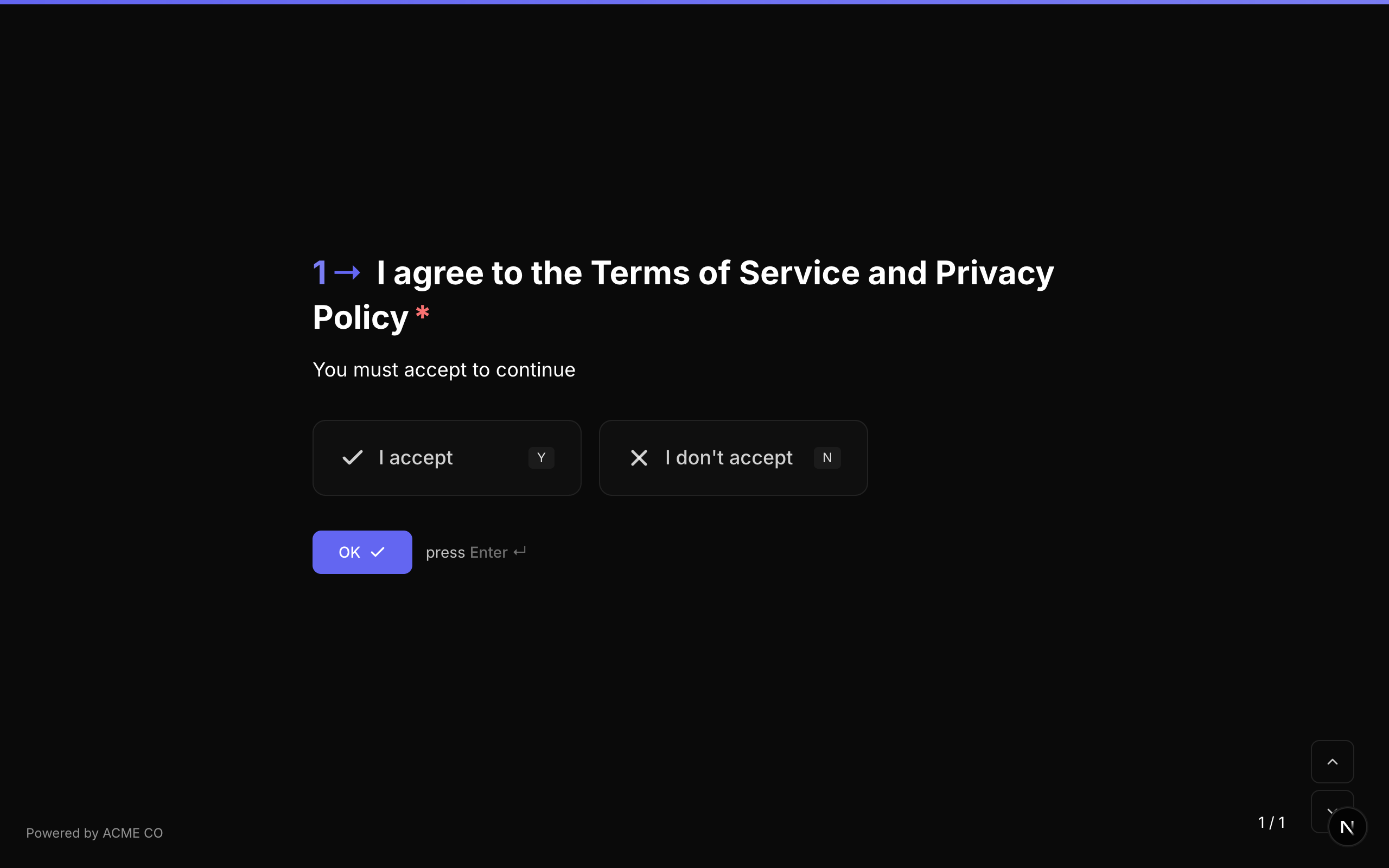
A terms and conditions acceptance question that presents a statement and requires the respondent to accept or decline.
Type identifier: legal
Properties
| Property | Type | Description | Default |
|---|---|---|---|
buttonText | string | The legal text or terms to display. This is the text of the legal agreement the respondent is accepting. | None |
Behavior
- Displays the legal text from
buttonText. - The respondent clicks "I accept" or "I don't accept".
- Typically used for privacy policies, terms of service, consent forms, and data processing agreements.
Validation
If required is true, the respondent must accept the terms to proceed. Declining (selecting "I don't accept") when the question is required will show a validation error.
Logic Jump Operators
equals, not_equals, is_answered, is_not_answered
When using equals, compare against true (accepted) or false (declined).
Answer Format
The answer is stored as a boolean (true for accept, false for decline, or null if unanswered).
Quiz Mode Scoring
Legal is a scorable question type:
- Knowledge Quiz: Set
correctAnswerswith"true"or"false". - Lead Qualification: Set
choiceScoreswith keys"true"and"false". - Match Quiz: Set
choiceOutcomesmapping acceptance/decline to end screens.
The Legal question type is functionally similar to Yes/No but is specifically designed for terms and conditions scenarios. The UI presents "I accept" / "I don't accept" buttons instead of "Yes" / "No".
Payment
Collect payments from respondents as part of the form flow using Stripe integration. Supports two payment modes, configurable currencies, and fixed or variable amounts.
Type identifier: payment
Payment Modes
| Mode | Plans | Description |
|---|---|---|
platform | All plans | NueForm processes payments and transfers funds to you. 2.9% + $0.30 fee per transaction. |
connect | Pro, Enterprise | Payments go directly to your connected Stripe account. No NueForm fees. |
Properties
| Property | Type | Description | Default |
|---|---|---|---|
price | number | Fixed payment amount in major units (e.g., 29.99). Leave empty for variable amounts. | None |
currency | string | Currency code (e.g., "USD", "EUR", "GBP"). | "usd" |
paymentMode | string | Payment mode: "platform" or "connect". | "platform" |
paymentDescription | string | Description that appears on the Stripe charge. | None |
paymentButtonText | string | Custom text for the pay button. | "Pay $X.XX" |
minAmount | number | Minimum allowed amount for variable payments (major units). | None |
maxAmount | number | Maximum allowed amount for variable payments (major units). | None |
stripeConnectionId | string | ID of the connected Stripe account to use. | None |
enableTracking | boolean | Track cumulative payment totals. | false |
paymentAccountId | string | Payment tracking account ID. | None |
accountTotalVariable | string | Variable name to store the running account total. | None |
Behavior
- If
priceis set, the respondent sees the fixed amount and provides card details. - If
priceis not set, the respondent enters their own amount (variable/donation mode). - The Stripe Payment Element is rendered for secure card collection.
- On successful payment, the form auto-advances to the next question.
- Les répondants paient avec la version publiée de la question : son prix, son minimum et son maximum, sa devise, son compte Stripe, son mode de paiement, sa description et le suivi des paiements. Un nouveau prix ou un nouveau compte Stripe, comme toute autre modification, prend effet lorsque vous publiez le formulaire. L'aperçu du builder facture le prix de votre brouillon.
Validation
If required is true, the respondent must complete the payment to proceed.
Logic Jump Operators
equals, not_equals, is_answered, is_not_answered
Answer Format
The answer is stored as a PaymentResult object:
{
  "paymentIntentId": "pi_abc123",
  "amount": 2999,
  "currency": "usd",
  "status": "succeeded"
}
For setup instructions, see the Collect Payments how-to guide.
Date
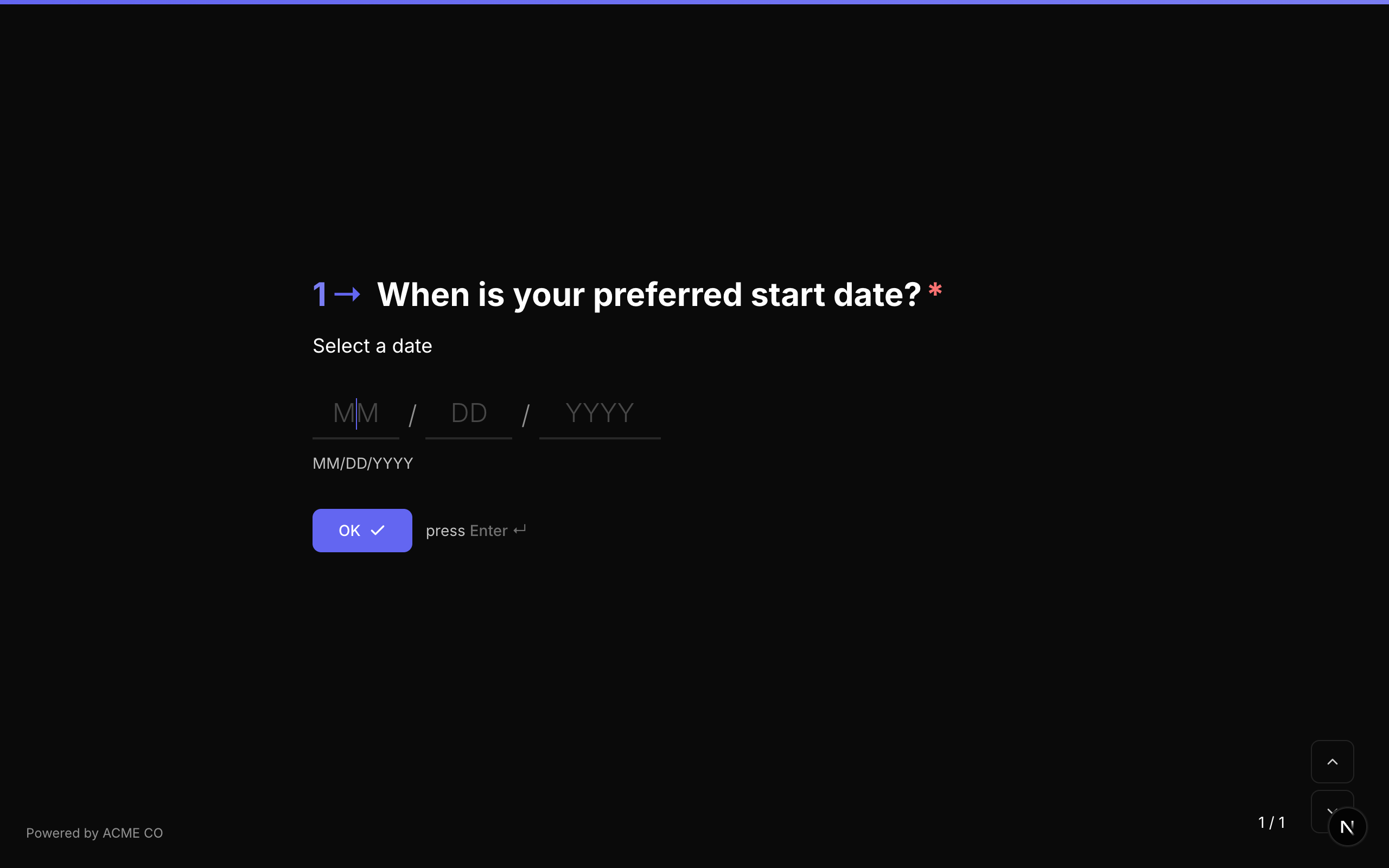
A date picker that allows respondents to select a date. Supports configurable date formats.
Type identifier: date
Properties
| Property | Type | Description | Default |
|---|---|---|---|
dateFormat | string | The format in which the date is displayed and parsed (e.g., "MM/DD/YYYY", "DD/MM/YYYY", "YYYY-MM-DD"). | System default |
Behavior
- Displays a date picker interface.
- The respondent can type a date manually or select from a calendar widget.
- The date is stored in ISO format regardless of the display format.
Validation
If required is true, the respondent must select a date.
| Rule | Description |
|---|---|
min | Minimum allowed date. |
max | Maximum allowed date. |
customMessage | Custom error message for date validation. |
Logic Jump Operators
equals, not_equals, is_answered, is_not_answered
Answer Format
The answer is stored as a string (the date value, typically in ISO format or the configured dateFormat).
Ranking
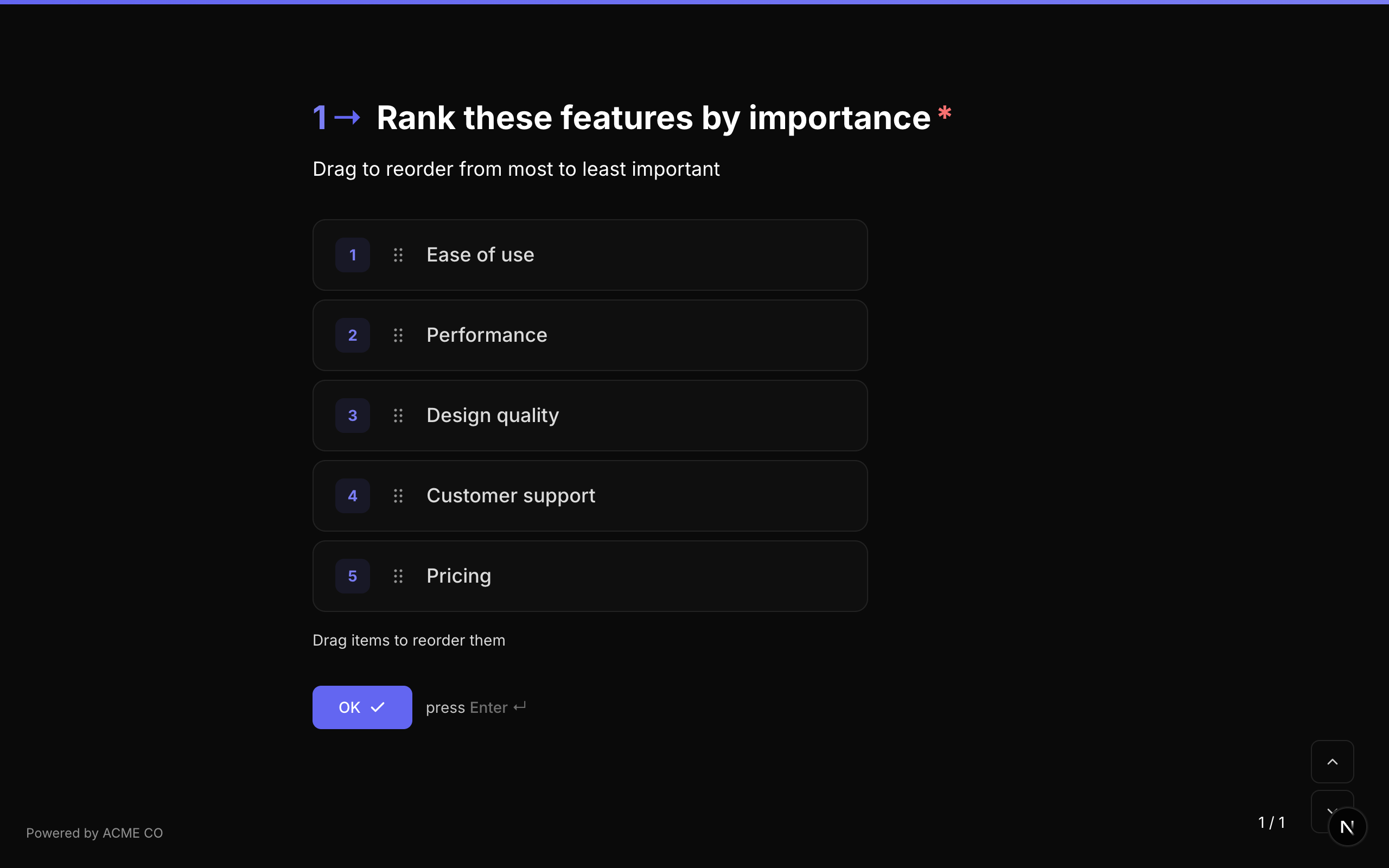
Present a list of items for the respondent to arrange in their preferred order by dragging and dropping.
Type identifier: ranking
Properties
| Property | Type | Description | Default |
|---|---|---|---|
choices | Choice[] | Array of items to rank. Each has an id and label. | [] |
choiceSource | string | Origine des éléments : fixed utilise choices ; variable les charge depuis une variable. Voir Choix depuis une variable. | fixed |
Behavior
- Items are displayed in a list.
- The respondent drags items to reorder them.
- Drag handles indicate draggable items.
- Touch and mouse interaction are both supported.
Validation
If required is true, the respondent must submit a ranking.
Logic Jump Operators
equals, not_equals, is_answered, is_not_answered
Answer Format
The answer is stored as an array of strings (choice IDs in the respondent's ranked order).
Matrix
A grid-based question type where respondents rate multiple items across multiple categories.
Type identifier: matrix
Properties
| Property | Type | Description | Default |
|---|---|---|---|
rows | string[] | Array of row labels (items being rated). | [] |
columns | string[] | Array of column labels (rating categories). | [] |
randomizeRows | boolean | Randomize the order of rows. | false |
randomizeColumns | boolean | Randomize the order of columns. | false |
rowSource | string | Origine des lignes : fixed utilise rows ; variable les charge depuis une variable. Voir Choix depuis une variable. | fixed |
columnSource | string | Origine des colonnes : fixed utilise columns ; variable les charge depuis une variable. | fixed |
Behavior
- Displays as a grid with rows on the left and columns across the top.
- The respondent selects one option per row.
- On mobile, the grid adapts to a stacked format for better usability.
Validation
If required is true, the respondent must select an option for every row.
Logic Jump Operators
equals, not_equals, is_answered, is_not_answered
Answer Format
The answer is stored as an object mapping row labels to selected column labels:
{
  "Quality": "Excellent",
  "Speed": "Good",
  "Support": "Average"
}
Contact Info
Collect structured contact information including name, email address, and phone number in a single question.
Type identifier: contact_info
Properties
| Property | Type | Description | Default |
|---|---|---|---|
defaultCountryCode | string | Default country code for the phone field (e.g., "US", "GB"). | None |
Behavior
- Displays fields for First Name, Last Name, Email, and Phone Number.
- The phone field includes a country code selector.
- Each sub-field can be individually required or optional.
Validation
If required is true, all visible sub-fields must be completed.
Logic Jump Operators
equals, not_equals, is_answered, is_not_answered
Answer Format
The answer is stored as an object:
{
  "firstName": "Jane",
  "lastName": "Smith",
  "email": "jane@example.com",
  "phone": "+14155551234"
}
Address
Collect a full mailing address with optional autocomplete powered by Google Places.
Type identifier: address
Properties
| Property | Type | Description | Default |
|---|---|---|---|
enableAddressAutocomplete | boolean | Enable Google Places autocomplete for address lookup. | false |
Behavior
- Displays fields for street address, city, state/province, postal code, and country.
- When autocomplete is enabled, typing in the street field shows address suggestions.
- Selecting a suggestion auto-fills all address fields.
Validation
If required is true, all address fields must be completed.
Logic Jump Operators
equals, not_equals, is_answered, is_not_answered
Answer Format
The answer is stored as an object:
{
  "street": "123 Main St",
  "city": "San Francisco",
  "state": "CA",
  "postalCode": "94105",
  "country": "US"
}
Data Node
An invisible question type that makes HTTP API calls during the form flow. Data Nodes are not rendered to respondents — they execute automatically and can fetch data, validate answers, or trigger external actions.
Type identifier: data_node
Properties
| Property | Type | Description | Default |
|---|---|---|---|
dataNodeUrl | string | The URL to call. Supports {variable} interpolation. | None |
dataNodeMethod | string | HTTP method: "GET", "POST", "PUT", "DELETE". | "GET" |
dataNodeHeaders | string | JSON string of request headers. Supports {variable} interpolation. | "{}" |
dataNodeBody | string | JSON string of request body. Supports {variable} interpolation. | "" |
dataNodeResponseVariable | string | Variable name to store the full JSON response. | None |
dataNodeTimeout | number | Request timeout in seconds. | 10 |
dataNodeSilent | boolean | Style NueForm uniquement : mode « envoyer et oublier », sans écran de chargement. | false |
dataNodeDebug | boolean | Style NueForm uniquement : affiche un panneau de débogage avec les détails de la requête et de la réponse. | false |
dataNodeLoadingText | string | Style NueForm uniquement : texte de chargement personnalisé affiché pendant la requête. | "Loading..." |
dataNodeValidation | boolean | Style NueForm uniquement : utilise le nœud comme validation bloquante de la question précédente. | false |
questionnaireRun | string | Formulaires de style Questionnaire uniquement : moment où le nœud s'exécute, keepUpdated (Garder à jour) ou onSubmit (Une fois, à l'envoi). Voir Dans le style Questionnaire. | keepUpdated si une question placée plus loin (y compris sa liste de choix et ses conditions) ou un Data Node placé plus loin et lui-même en keepUpdated utilise la variable de réponse (les étapes e-mail et les nœuds onSubmit ne comptent pas), sinon onSubmit. Un nœud ajouté dans l'éditeur démarre en onSubmit. |
Behavior
- S'exécute automatiquement lorsqu'il est atteint dans le flux du formulaire (style NueForm et appels téléphoniques). En style Questionnaire, c'est le réglage Quand exécuter qui décide — voir ci-dessous.
- All
{variableName}tokens in URL, headers, and body are replaced with current variable values. - If
dataNodeResponseVariableis set, the full JSON response is stored as a form variable. - In silent mode, the request fires in the background with no loading indicator.
- In validation gate mode, a failing request blocks progression from the previous question.
Use Cases
- Fetch external data: Look up product details, pricing, or user profiles during the form flow.
- Validate answers: Check an email against your database, verify a coupon code, or validate an address.
- Trigger actions: Send data to a webhook, create a record in your CRM, or start a workflow.
Dans le style Questionnaire
Un questionnaire affiche toutes les questions en même temps : il n'y a donc pas de moment où le répondant « atteint » un Data Node. C'est son réglage Quand exécuter qui décide :
- Garder à jour — s'exécute quand les réponses qu'il utilise changent. Idéal pour les recherches, comme charger les options d'une question suivante.
- Une fois, à l'envoi — s'exécute une seule fois, sur nos serveurs, lorsque le répondant clique sur Soumettre. Idéal pour envoyer des données.
Choisir Garder à jour pour une requête POST, PUT, PATCH ou DELETE affiche un avertissement, car la requête s'exécuterait à nouveau chaque fois que ces réponses changent. Lors des appels téléphoniques, les Data Nodes s'exécutent toujours quand l'appel les atteint, quel que soit le style du formulaire. Voir Style Questionnaire pour les détails, le réglage par défaut et les pastilles de l'éditeur.
En style Questionnaire, l'éditeur masque Mode silencieux, Mode débogage, Utiliser comme validation et Texte de chargement : ils ne s'appliquent qu'au style NueForm, et une requête qui échoue ne bloque jamais Soumettre. Ils conservent leur valeur : repasser au style NueForm les rétablit.
Data Nodes are invisible to respondents. They appear in the builder and workflow editor but are skipped in the live form — only the API call executes. See the Data Nodes how-to guide for examples.
Composite
Intégrez un ensemble de questions réutilisable et versionné — défini une fois sur la page Composites et partagé entre les formulaires. Les répondants voient tous les champs du composite sur un seul écran et les envoient ensemble. Voir le guide Composites pour créer, modifier, publier et suivre les entrées.
Type identifier: composite_ref
Properties
| Property | Type | Description | Default |
|---|---|---|---|
compositeId | string | Le composite référencé. Défini via le sélecteur dans le panneau de la question. | — |
fields | FormQuestion[] | Dérivé — les sous-champs publiés du composite, figés dans l'instantané du formulaire lors de sa publication. Jamais modifié directement sur la question. | — |
Validation
Les sous-champs obligatoires sont validés ensemble lorsque le répondant envoie l'écran.
Logic Jump Operators
is_answered, is_not_answered sur la question elle-même. Les sous-réponses individuelles peuvent être ciblées dans n'importe quelle condition via l'adressage de sous-champ (questionId.subFieldId) — les sous-champs apparaissent sous leur parent dans le sélecteur de champ de condition.
Answer Format
Un objet indexé par l'identifiant de sous-champ :
{ "sub_first_name": "Ada", "sub_title": "Director", "sub_email": "ada@example.com" }
L'envoi est aussi enregistré comme une entrée de composite, visible dans tous les formulaires depuis la vue Entrées du composite.
Modifier les champs d'un composite change sa copie de travail partagée — chaque formulaire qui le référence récupère les modifications une fois le composite publié et le formulaire republié. La pastille « Modifications non publiées » sur le badge du canevas publie le composite sur place.
Common Advanced Features
Rich Text in Titles and Descriptions
All advanced question types support rich text in their title and description fields. Rich text is entered through a Tiptap-based editor in the form builder and supports:
- Bold, italic, underline, and
strikethrough - Links (with
href,target,relattributes) - Ordered and unordered lists
- Inline code
- Subscript and superscript
- Custom font families and colors via inline styles
The rich text is stored as HTML and sanitized before rendering using DOMPurify with a strict allowlist of tags and attributes.
Variable Substitution
All advanced question types support {variableName} substitution in their title and description fields. See the Variables guide.
Media Attachments
All advanced question types support media attachments (image, video, icon, QR code) with the full range of layout options. See the Creating Forms guide.